
GH-900: GitHub Foundations

The GH-900: GitHub Foundations certification validates a candidate’s understanding of the fundamental concepts, workflows, and best practices for collaborating, contributing, and working effectively within the GitHub ecosystem. This entry-level credential demonstrates proficiency in core GitHub functionality, foundational Git concepts, and effective repository management, ensuring candidates can confidently engage in collaborative software development projects. The exam evaluates knowledge across four primary domains:
- Collaboration – Understanding collaborative workflows, managing issues and pull requests, engaging with project boards, and contributing effectively to team projects.
- GitHub Products – Familiarity with GitHub offerings such as GitHub Free, Pro, Teams, and Enterprise, along with integrated features like Actions, Codespaces, and Discussions.
- Git Basics – Grasping essential Git commands and concepts, including commits, branches, merges, cloning, and version history tracking.
- Working Within GitHub Repositories – Managing repository settings, structuring projects, applying best practices for documentation, and ensuring proper version control.
Target Audience
This certification is ideal for:
- New GitHub users seeking to confirm their foundational knowledge and gain formal recognition of their skills.
- Students and entry-level professionals aiming to demonstrate competency in collaborative development environments.
- Developers, project managers, and contributors transitioning to GitHub who need a verified understanding of its tools, products, and workflows.
- Teams and organizations looking to benchmark baseline GitHub competency for onboarding and training purposes.
Exam Details

- The GH-900: GitHub Foundations exam is designed for beginner-level candidates and serves as a foundational validation of skills in collaborating, contributing, and working within the GitHub platform. It is relevant to a wide range of roles, including Administrators, App Makers, Developers, DevOps Engineers, and Solution Architects, making it suitable for professionals and students seeking to establish or verify their GitHub expertise.
- Candidates are allotted 100 minutes to complete the assessment, which primarily focuses on features that are in General Availability (GA). However, the exam may also include questions on Preview features if they are widely used within the GitHub ecosystem. The assessment is proctored to ensure the integrity of the certification process, and some sections may include interactive components to evaluate practical skills in a hands-on environment.
- The exam is available in English, Spanish, Portuguese (Brazil), Korean, and Japanese, making it accessible to a diverse, global audience.
- Successfully earning the GH-900 certification demonstrates a verified understanding of GitHub’s core concepts and workflows, reinforcing the candidate’s ability to contribute effectively to collaborative development projects.
Course Outline
The exam covers the following topics:
Domain 1: Overview of Git and GitHub (22%)
Understanding the basics of Git
- Explaining what Git is and why it is used
- Describe the basic Git workflow
- Understanding the concept of repositories
- Explaining the difference between local and remote repositories
- Initializing a Git repository
- Clone a repository
- Add and commit changes
- Push and pull changes
- Understanding branching and merging
- Creating a GitHub account
- Create and manage repositories on GitHub
- Understanding the GitHub interface
- Using GitHub issues and pull requests
Domain 2: Working with GitHub Repositories (8%)
- Configuring repository settings
- Set up repository permissions
- Using repository templates
Working with files in a repository
Domain 3: Learn About Collaboration Features (30%)
- Fork repositories
- Creating and managing pull requests
- Review and merge pull requests
- Using GitHub Actions for CI/CD
Using GitHub for project management
- Creating and managing issues
- Use labels, milestones, and projects
- Tracking progress with GitHub Projects
Domain 4: Understand Modern Development (13%)
- Understanding the principles of DevOps
- Using GitHub Actions for automation
- Implementing CI/CD pipelines

Using GitHub for code review
Domain 5: Overview of Project Management (7%)
- Creating and managing GitHub Projects
- Using project boards for task management
- Integrate GitHub Projects with issues and pull requests
Domain 6: Understand Privacy, Security, and Administration (10%)
- Set up branch protection rules
- Using security features like Dependabot
- Managing repository access and permissions
Administering GitHub organizations
Domain 7: Learn About the Benefits of the GitHub Community (10%)
Engaging with the GitHub community
- Participate in open source projects
- Using GitHub Discussions
- Contributing to community projects
GH-900: GitHub Foundations Exam FAQs

Exam Policies
Microsoft offers various exam policies. Some of them are:
- Proctoring and Assessment Format
- The GH-900: GitHub Foundations exam is a fully proctored certification assessment designed to provide a secure, consistent, and fair evaluation process. The assessment may include interactive components that replicate real-world GitHub workflows, allowing candidates to demonstrate their ability to collaborate, contribute, and manage repositories effectively. These interactive elements are intended to evaluate both conceptual knowledge and practical application of GitHub’s foundational features, ensuring candidates can work confidently within the GitHub environment.
- Exam Duration and Candidate Experience
- Candidates are given 100 minutes to complete the GH-900 assessment. It is strongly recommended to review the official Exam Duration and Exam Experience guidelines in advance, as these provide valuable insights into question structure, time management strategies, and potential interactive or task-based exercises. Being familiar with these details can help candidates approach the exam with confidence, manage time effectively, and perform consistently across all sections.
- Retake Policy
- Candidates who do not pass the exam on their first attempt may retake it after a 24-hour waiting period. Subsequent retakes will require progressively longer intervals, based on the number of prior attempts. This policy is designed to allow sufficient time for candidates to review concepts, improve their understanding, and strengthen their skills before reattempting the certification.
GH-900: GitHub Foundations Exam Study Guide
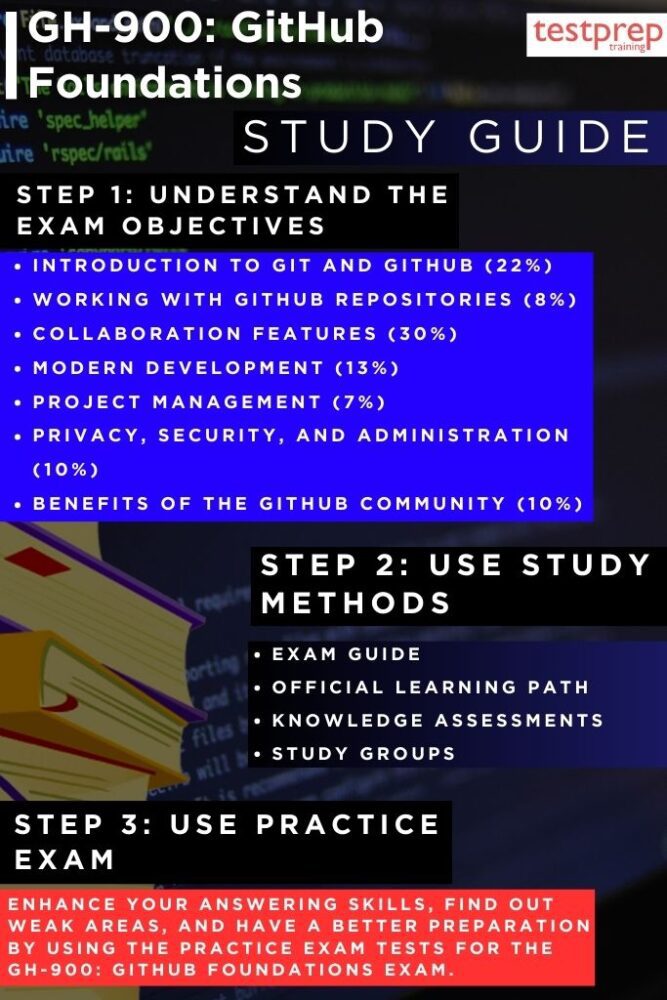
Step 1 – Understand the Exam Objectives
The first step toward passing the GH-900: GitHub Foundations exam is gaining a complete and accurate understanding of what the assessment measures. Visit the official Microsoft Learn exam page to review the “Skills Measured” section in detail. This outline will clearly define the scope of the exam, including key domains such as collaboration workflows, GitHub product offerings, Git basics, and repository operations.
Make note of the percentage weight assigned to each domain, as this will help you prioritize your preparation efforts. For example, if a large portion of the exam focuses on working within repositories, you can allocate more time to mastering branching, commits, pull requests, and repository settings. Building your study plan around these objectives ensures your preparation is both targeted and efficient, avoiding wasted time on topics that are less likely to appear.
Step 2 – Explore the Official Learning Path
Microsoft provides a structured learning path for GH-900 that consists of interactive training modules designed for beginners but valuable for anyone looking to strengthen their GitHub knowledge. These modules cover everything from creating repositories to understanding version control principles, collaborating via pull requests, managing issues, and configuring repository security settings. Progress through the modules sequentially, starting from fundamental concepts before tackling more complex scenarios. Many of these modules include embedded exercises that allow you to work directly in a GitHub environment, which helps bridge the gap between theory and real-world application. Commit to completing the entire learning path to ensure no critical topic is overlooked. However, the training modules are:
– Course GH-900T00-A: GitHub Foundations
The GitHub Foundations course offers a beginner-friendly yet comprehensive overview of GitHub’s key concepts, features, and products, focusing on repository management, version control, and collaborative workflows. Through structured modules and hands-on exercises, learners gain practical skills in using commits, branches, pull requests, issues, and discussions, as well as managing notifications. Designed for those seeking to understand GitHub best practices, the course equips participants to navigate the platform confidently and contribute effectively to team-based projects.
– Introduction to GitHub
Introduction to GitHub teaches the essential skills for using the platform effectively, covering core features such as issues, notifications, branches, commits, and pull requests. Learners will explore repository management, understand the GitHub flow, engage in collaborative tools like issues and discussions, and learn to manage notifications and subscriptions for efficient project participation.
Step 3 – Assess Your Knowledge Regularly
Simply reading or watching tutorials is not enough — active recall is key to retention. At the end of each Microsoft Learn module, take the knowledge check quizzes seriously. These questions are not just checkpoints but indicators of how well you can recall and apply what you’ve learned. If you consistently miss questions on a particular topic, revisit that module or find additional resources to strengthen your understanding. Additionally, consider keeping a self-assessment log to track your progress over time. This will allow you to see measurable improvement and identify trends in your performance before exam day.
Step 4 – Join Study Groups and Discussion Forums
Learning in isolation can limit your exposure to different perspectives and use cases. Join online study groups, GitHub community forums, or LinkedIn learning communities dedicated to GitHub certifications. In these groups, you can discuss workflows, troubleshoot problems, and get advice from others who have already passed the exam. Participating in such discussions exposes you to practical tips and real-world scenarios that might not be covered in the official documentation. Moreover, explaining concepts to others reinforces your own understanding, turning passive knowledge into active skill.
Step 5 – Practice with GH-900 Exam-Style Questions
Familiarity with the exam format is a major confidence booster. Seek out practice tests or simulated question banks that mirror the structure and difficulty level of the GH-900 exam. These practice sessions should be taken under timed conditions to replicate the pressure of the real assessment. Pay attention to question wording, as the GH-900 may include scenario-based prompts that test both conceptual understanding and applied skills. After each practice session, review not only your incorrect answers but also the correct ones, to understand the reasoning behind them. This approach ensures you are learning from every attempt and strengthening your ability to interpret questions accurately.
Step 6 – Reinforce with Hands-On GitHub Practice
Since the GH-900 exam may include interactive components, it’s essential to be comfortable navigating the GitHub interface and performing basic operations without hesitation. Create personal repositories, experiment with branching strategies, submit pull requests, and configure repository settings. This practical engagement will make the hands-on portions of the exam feel intuitive, allowing you to focus on accuracy rather than figuring out navigation during the assessment.
Step 7 – Review and Refine Before Exam Day
In the days leading up to the exam, perform a final review of all domains. Revisit your notes, rewatch any complex module sections, and retake practice assessments to confirm readiness. Focus on both your strongest and weakest topics — reinforcing your strengths ensures you score maximum points in those areas, while improving your weaker topics reduces the risk of losing marks. Ensure that your exam setup meets all proctoring requirements, including a stable internet connection, a quiet testing environment, and the necessary identification documents. Walking into the exam with both technical readiness and mental confidence will greatly enhance your performance.
