
Salesforce Certified Tableau Server Administrator

The Salesforce Certified Tableau Server Administrator certification is designed for professionals who want to demonstrate their expertise in managing and maintaining Tableau Server environments. This credential highlights your ability to configure, monitor, and optimize Tableau Server, ensuring smooth and secure data visualization workflows within an organization.
This certification validates a candidate’s practical knowledge of Tableau Server operations, particularly in a single-machine setup. It is ideal for individuals responsible for administering Tableau environments, managing users, and ensuring system performance and reliability.
Professionals who earn this certification are recognized for their ability to handle core administrative tasks, including server configuration, security management, and content governance. Upon successfully passing the exam, candidates earn the title of Salesforce Certified Tableau Server Administrator. This certification serves as a formal recognition of your ability to manage Tableau Server environments and contributes to your credibility in the data analytics and business intelligence domain.
Key Skills Validated
Earning this certification demonstrates proficiency in:
- Tableau Server installation and configuration
- User authentication and permission management
- Monitoring server performance and usage
- Managing data sources and published content
- Troubleshooting common server issues
- Maintaining system security and governance
Target Audience
The certification is suitable for a wide range of professionals, including:
- Tableau Server Administrators
- Data Analysts and BI Professionals
- IT Professionals managing analytics platforms
- Consultants, freelancers, and partners working with Tableau solutions
Experience Requirements
While there are no mandatory prerequisites for the exam, candidates are generally expected to have:
- Around six months of hands-on experience with Tableau Server
- Practical exposure to managing a single-machine Tableau Server environment
- Familiarity with day-to-day administrative tasks and troubleshooting
Exam Details
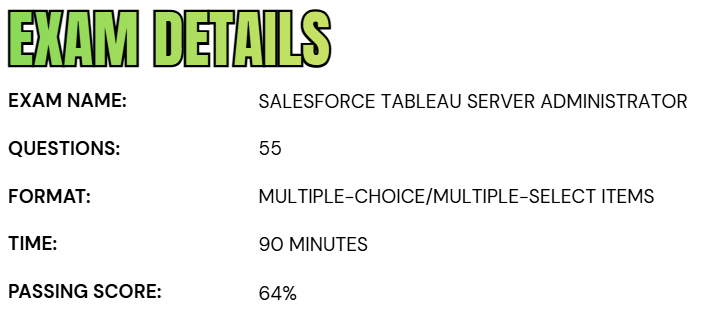
- The Salesforce Certified Tableau Server Administrator exam is a proctored assessment designed to evaluate a candidate’s ability to manage and administer Tableau Server environments effectively.
- The exam consists of 55 multiple-choice and multiple-select questions, along with up to five additional unscored questions that are included for evaluation purposes and do not affect the final result.
- Candidates are given a total of 90 minutes to complete the exam, and a minimum score of 64% is required to pass. The exam can be taken either at an authorized testing center or through an online proctored environment, offering flexibility based on the candidate’s preference.
- It is important to note that no reference materials, whether in hard copy or digital form, are permitted during the exam. The unscored questions are randomly distributed throughout the test and are used solely to gather statistical performance data, ensuring the ongoing quality and relevance of the certification exam.
Course Outline
The Salesforce Certified Tableau Server Administrator exam evaluates a candidate’s expertise and practical understanding across the following key domains and competencies.
1. Understand about Connecting to and Preparing Data: 20%
1.1 User Experience
- User Interface
- Navigation
1.2 Topology
- Identifying client components
- Identifying server components
- Describing how they work together
1.3 Versions
- 1.3.1 Understand:
- How to identify the current version of Tableau Server
- Where to obtain the latest release of Tableau Server
- Where to access release notes of Tableau Server
1.4 Minimum Hardware Requirements
- 1.4.1 Understand:
- RAM requirements
- CPU requirements
- Hard disk requirements
1.5 Software Requirements
- 1.5.1 List the supporting Operating Systems
- 1.5.2 Understand:
- 1.5.2.1 Browser requirements
- 1.5.2.2 Options for email alerts
- 1.5.2.3 Anti-virus concerns
- 1.5.3 Identify the SMTP Server
- 1.5.4 Be familiar with potential port issues
- 1.5.5 Explain the purpose and benefits of a dedicated server
- 1.5.6 Identify the considerations for running in the cloud
1.6 Licensing
- 1.6.1 Understand user-based licensing
- 1.6.1.1 Describe the different license types
- 1.6.1.2 Describe how license types map to site roles
1.7 Server Processes
- 1.7.1 Describe each Tableau Services Manager and Tableau Server process
- 1.7.2 Understand:
- 1.7.2.1 Default process count at installation
- 1.7.2.2 Multiple-instance processes
- 1.7.2.3 Process-to-process workflows
- 1.7.2.4 Processes in distributed and high-availability environments
- 1.7.2.5 Purpose of a load balancer
1.8 Data Source Identification
- Identifying the ports required
- Identifying the necessary database drivers
Understand the differences between:- File vs. Relational vs. Cube
- Extract vs. Live Connections
- Explaining the benefits of published data sources
1.9 Infrastructure Network
- Understanding network latency implications
- Explaining the risks of Dynamic-IP addressing
2. Learn the Process of Installation and Configuration: 26%
2.1 Installation
- Understanding installation steps and options
- Install Path
- Gateway port
- Understanding Identity Store and SSO options:
- External (Active Directory) vs. local
- Trusted Tickets
- SAML
- Kerberos and OpenID Connect
- Describing the impact of the automatic-login options
- Understanding how to set up SSL
- Understanding Tableau best practices for installing a single-machine environment
- Understanding silent installs
2.2 Tableau Server Configuration
- Understanding cache settings
- Understanding how to:
- Applying process distribution
- Configuring Email alerts / subscriptions
- Configuring optional customizations
- Describing:
- Site configuration options
- User quotas 2.2.3.3 Storage quota
- How to enable and edit site subscriptions
- Project configuration options
- Group and User Configuration options
- Understanding who can add users
2.3 Adding Users
- License type and site role
- Admin level
- Publisher level
- Importing via Active Directory or Local
2.4 Security
- Describe the security configuration for:
- Site level
- Project level
- Group level
- User level
- Data source level
- Workbook level

2.5 Permissions
- Understanding:
- System permission composition
- The ramifications of permission design
- The Tableau Security Model
- Describing the differences between Allow v. Deny v. None
3. Understand Administration: 36%
3.1 Understanding about:
- Maintaining data connections
- Creating schedules
- Creating, editing and deleting subscriptions
- Performing Server analysis
- Completing a backup and restore
- Performing cleanup
- Adding, removing, or deactivating users
- Updating licenses
- Starting, stopping or restarting
- Utilizing tsm and tabcmd
- Using REST API
- Working with Log Files
- Understanding Embedding
- Monitoring Desktop license usage
- Managing workbook and data source revision history
3.2 Describe how to:
- View server status in multiple ways
- View email alerts
- Set data-driven alerts
- Use built-in administrative views
- Create custom admin views
- Create a performance recording
- Create a nested project
- Work with Sites and Site Admin options
3.3 Contrast end-user with System-administrator capabilities
3.4 End-user Abilities
3.5 Understand:
- Table recommendations
- Publishing views and data sources
- Renaming a workbook
- Interacting with a view via the Web
- Web authoring & editing
- How to share views
- Data Source Certification
- Extract caching
4. Learn About Troubleshooting: 12%
4.1 Understanding requirements of third-party cookies in a browser
4.2 Understand how to:
- Reset passwords for a Tableau user or Tableau Run-As Service account
- Package log files for reporting
- Using tsm to validate site resources
- Rebuilding the search index
- Using maintenance analysis reports
- Create/open support requests
Migration & Upgrade: 6%
- Understanding the upgrade process
- Explaining how and why to perform a clean reinstall
- Describing how to migrate to different hardware
- Understanding backwards compatibility
Salesforce Certified Tableau Server Administrator Exam FAQs
Salesforce Certification Candidate Code of Conduct
At Salesforce, trust is a core principle that underpins the entire certification ecosystem. Maintaining the integrity and credibility of Salesforce certifications is a shared responsibility among all participants. As part of the certification process, candidates are required to review and agree to the Salesforce Certification Program Agreement and Code of Conduct before starting each exam. This ensures adherence to ethical standards and helps protect the value of the credential for all stakeholders.
Testing Center (Onsite) Exam Reschedule and Cancellation Policy
Candidates who have registered for an onsite exam at a testing center must make any changes to their appointment at least 48 hours before the scheduled start time. It is important to understand that this requirement refers to a strict 48-hour window, not two business days.
Rescheduling or canceling an exam more than 48 hours in advance can be done through the Pearson test taker account without any additional charges. However, failure to appear for the exam without prior notice to the Salesforce Help team will result in the candidate being marked as a no-show, and the full exam fee will be forfeited.
Online Proctored Exam Reschedule and Cancellation Policy
For online proctored exams, candidates must reschedule or cancel their appointment at least 24 hours prior to the scheduled exam time. This timeframe is calculated as a full 24-hour period and does not correspond to a single business day.
Changes made more than 24 hours before the exam can be completed through the Pearson VUE account at no extra cost. Adhering to this policy ensures a smooth scheduling experience and avoids unnecessary penalties.
Salesforce Certified Tableau Server Administrator Exam Study Guide
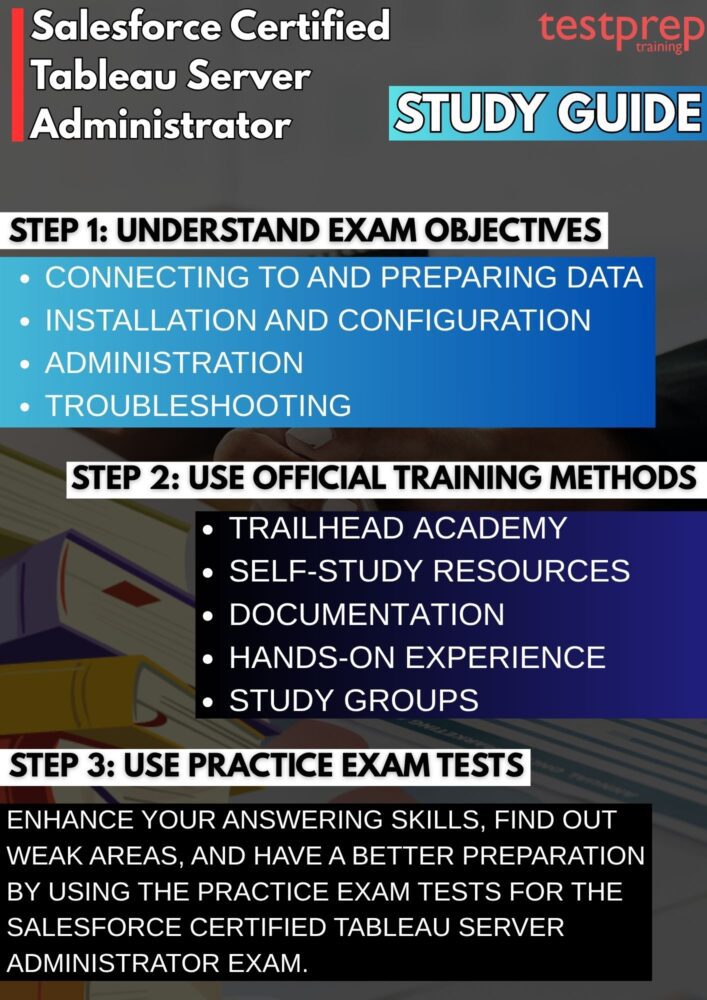
1. Understand the Exam Objectives and Structure
Start by carefully reviewing the official exam guide to gain a clear understanding of the topics covered and their relative importance. Focus on core areas such as Tableau Server architecture, installation and configuration, user and permission management, security practices, and performance monitoring.
Break down each objective into subtopics and map your current knowledge against them. This helps you identify strengths and gaps early, allowing you to create a targeted and efficient study plan rather than studying everything broadly.
2. Build a Strong Foundation with Trailhead Academy
Structured learning plays a key role in mastering Tableau concepts. Enroll in expert-led courses available through Trailhead Academy, which provide guided instruction, demonstrations, and practical exercises. This covers courses to help you understand how data is visualized and prepared. These courses not only strengthen your fundamentals but also align closely with real-world administrative responsibilities. Some of them are:
– Tableau Server Administration (TSA201)
This foundational course is designed to equip Tableau Server administrators with the knowledge required to effectively deploy and manage Tableau Server environments. Delivered as a comprehensive 3-day instructor-led program, it focuses on critical aspects such as installation, configuration, governance, security, performance optimization, and scalability.
Participants gain practical insights into how to manage enterprise-level Tableau deployments, ensuring systems are secure, efficient, and aligned with organizational requirements. The course is highly technical in nature and is best suited for professionals responsible for server setup, configuration, site implementation, and ongoing monitoring of Tableau Server environments.
– Tableau Desktop I: Fundamentals (TTD101)
This beginner-level course provides a strong introduction to Tableau Desktop and is ideal for individuals looking to build core data visualization and analysis skills. Conducted over two days in an instructor-led format, it covers essential concepts such as connecting to data, creating visualizations, building dashboards, and applying design best practices.
Learners develop the ability to transform raw data into meaningful insights using Tableau tools. The course supports usage across Tableau Desktop, Tableau Cloud, and Tableau Server, making it versatile for different environments. It is particularly recommended for data analysts and users with a Creator license who want to effectively analyze and present data.
– Server Administration
This course focuses on the core principles and best practices required to successfully manage Tableau Server. It emphasizes key areas such as system installation, configuration, governance, security controls, performance tuning, and scalability strategies.
Designed specifically for Tableau Server administrators, the course prepares learners to handle responsibilities including deploying Tableau Server, managing sites, monitoring system health, and ensuring optimal performance. It serves as a practical guide for professionals involved in maintaining and optimizing Tableau Server environments in real-world scenarios.
3. Use Official Self-Study Resources for Deep Learning
Rely on Tableau’s official learning resources to gain accurate and in-depth knowledge. Materials such as Tableau Product Support, Tableau Product Help, and the Tableau Server Administrator Guide provide detailed explanations of features, configurations, and troubleshooting methods.
These resources are especially useful for understanding backend operations, server settings, and best practices. Make it a habit to cross-reference topics from the exam guide with these materials to ensure complete coverage.
4. Explore Documentation, Best Practices, and Use Cases
In addition to core study materials, dive into official documentation, tip sheets, and user guides. These resources often highlight practical scenarios, optimization techniques, and recommended configurations. Understanding best practices—such as efficient user management, secure authentication methods, and performance tuning—will not only help in the exam but also prepare you for real-world job roles. Focus on learning the “why” behind each concept, not just the “how.”
5. Gain Hands-On Experience in a Tableau Server Environment
Practical experience is critical for this certification. Set up a Tableau Server (or use a trial/lab environment) and actively perform administrative tasks. Practice installing and configuring the server, managing users and groups, assigning permissions, publishing data sources, and monitoring system performance.
Experiment with different scenarios such as troubleshooting errors, optimizing slow dashboards, and managing server resources. This hands-on exposure will significantly improve your confidence and problem-solving ability during the exam.
6. Participate in Study Groups and Community Discussions
Engaging with the Tableau community can accelerate your learning. Join forums, discussion groups, and professional networks where you can interact with other learners and experienced administrators. These platforms allow you to ask questions, share insights, and learn from real-world challenges faced by others. Community discussions often provide practical tips, exam strategies, and clarification on complex topics that may not be clearly explained in official documentation.
7. Practice with Mock Exams and Performance Reviews
Regularly test your knowledge using practice exams and sample questions. This helps you become familiar with the question format, improves your time management skills, and reduces exam anxiety. After each practice test, carefully review your answers—especially the incorrect ones—to understand the reasoning behind them. Focus on identifying patterns in your mistakes and revisiting those topics. Consistent practice and review will ensure you are fully prepared and confident on exam day.
