
Salesforce Certified Tableau Consultant

The Salesforce Certified Tableau Consultant certification is designed for professionals who specialize in transforming data into meaningful business insights. These experts work closely with stakeholders to design and implement analytics solutions that drive informed decision-making and measurable value.
Certified consultants go beyond basic reporting—they combine strong technical expertise with strategic thinking to deliver scalable, high-performing, and visually compelling analytics solutions across organizations.
Role of a Tableau Consultant
A Tableau Consultant plays a critical role in bridging business needs with data capabilities. Their primary responsibility is to design end-to-end analytics solutions using the Tableau ecosystem. They are expected to:
- Understand complex business requirements and translate them into actionable dashboards
- Design intuitive and impactful data visualizations
- Ensure optimal performance and scalability of Tableau solutions
- Establish governance frameworks and data best practices
- Drive user adoption and long-term analytics strategy
Certification Purpose and Value
This certification validates a candidate’s ability to lead analytics projects within the Tableau platform. It demonstrates expertise in:
- Visual design and storytelling with data
- Performance optimization and scalability
- Data governance and security
- Deployment and management across Tableau environments
It is ideal for professionals such as consultants, partners, freelancers, and internal team members who are responsible for delivering advanced analytics solutions using Tableau tools. It emphasizes not just technical proficiency, but also the ability to design solutions that scale, perform, and deliver real business value.
Tableau Products Covered
Candidates are expected to have working knowledge and hands-on experience with multiple Tableau products, including:
- Tableau Desktop
- Tableau Prep
- Tableau Cloud
- Tableau Server
- Tableau Bridge
Target Audience
The Salesforce Certified Tableau Consultant certification is intended for experienced professionals who:
- Lead the design and implementation of analytics solutions
- Work directly with clients or stakeholders to solve complex data challenges
- Handle large-scale, enterprise-level projects
- Provide strategic recommendations for data-driven transformation
- Independently troubleshoot and resolve performance issues
Experience Requirements
While there are no formal prerequisites for the exam, successful candidates typically have:
- At least 2 years of hands-on experience with Tableau products
- Experience building diverse and complex dashboards and data models
- Practical exposure to Tableau Server or Tableau Cloud implementations
- Strong understanding of data structures, performance tuning, and visualization best practices
Expected Skill Level
This certification represents an advanced level of Tableau expertise. Candidates are expected to:
- Work confidently with complex datasets and data sources
- Design scalable and maintainable analytics solutions
- Optimize dashboards for performance and usability
- Implement governance and security best practices
- Lead projects from planning to deployment
Relationship to Other Tableau Certifications
The Salesforce Certified Tableau Consultant certification builds upon foundational Tableau knowledge. Candidates are expected to already possess the skills covered in:
- Salesforce Certified Tableau Desktop Foundations
- Salesforce Certified Tableau Data Analyst
Unlike these earlier certifications, the Consultant exam focuses on applying those skills in real-world, complex scenarios rather than testing basic concepts.
Certification Outcome
Upon successfully passing the exam, candidates earn the Salesforce Certified Tableau Consultant credential. This certification:
- Validates advanced Tableau expertise
- Enhances professional credibility
- Opens opportunities in consulting, analytics leadership, and enterprise data roles
- Demonstrates the ability to deliver high-impact, data-driven solutions
Exam Details
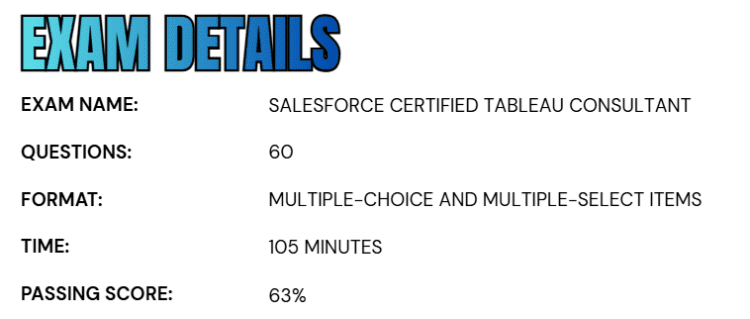
- The Salesforce Certified Tableau Consultant exam is structured to assess a candidate’s advanced knowledge and practical expertise in designing and implementing analytics solutions using the Tableau platform.
- The exam consists of 60 multiple-choice and multiple-select questions, along with up to five additional unscored items that are included for evaluation purposes.
- Candidates are given a total of 105 minutes to complete the exam, requiring both accuracy and time management skills.
- To successfully pass, candidates must achieve a minimum score of 63%, demonstrating a solid understanding of Tableau concepts, performance optimization, governance, and solution design.
- The exam is offered in a proctored format, allowing candidates to take it at an authorized testing center or through a secure online environment, whichever is more convenient.
- It is important to note that the exam is closed-book, meaning no reference materials—either physical or digital—are permitted during the test. Additionally, the unscored questions are randomly distributed throughout the exam and are used solely for research and performance analysis; they do not affect the candidate’s final score.
Course Outline
The Salesforce Certified Tableau Consultant Exam covers the following topics:
1. Understand about Evaluating Current State: 22%
1.1 Mapping current state of analytics to future state
- Mapping business needs to Tableau capabilities.
- Translating analytical requirements into Tableau context by using best practices.
- Recommending whether to use Tableau Server or Tableau Cloud, including migration.
- Recommending and planning a Tableau Server upgrade.
1.2 Evaluating current data structures
- Evaluating whether existing data supports business needs.
- Evaluate lineage of existing data structures.
- Evaluating existing data structures for performance risks and enhancement opportunities.
2. Learn About Planning and Preparing Data Connections: 22%
2.1 Planning for data transformation
- Recommending an appropriate data transformation strategy.
- Specifying the requirements for minimum level of granularity.
2.2 Designing a row-level security (RLS) data structure
- Implementing RLS and an entitlement table.
- Identifying group functions versus user functions.
- Comparing RLS approaches.
2.3 Planning and implementing advanced connections to data
- Recommending an appropriate method to connect to data, such as Web Data Connectors, web extract APIs, custom SQL, or ODBC.
- Creating connections by using Tableau Bridge.
- Specifying aggregation level and strategy for data sources in Tableau products (Tableau Desktop, Tableau Prep, Tableau Cloud, Tableau Server).
3. Understand about Designing and Troubleshooting Calculations and Workbooks: 40%
3.1 Designing analytics for advanced use cases
- Recommending when to use an advanced chart type, such as Sankey, chord, radar, tile map, small multiples, and data densification.
- Identifying the effect of the Tableau order of operations on calculations.
- Troubleshooting issues caused by the Tableau order of operations.
- Planning and implementing advanced techniques to build interactivity into dashboards, such as dynamic URL actions, parameter actions, and filter actions.
3.2 Designing workbooks to optimize performance
- Identifying and resolving resource-intensive queries.
- Maximizing caching for Tableau Server.
- Identifying and resolving performance issues caused by calculations such as string comparisons, IF THEN statements, and Level of Detail (LOD) expressions.
- Recommending calculations that should be moved upstream of Tableau.
- Interpreting and resolving issues by using performance recordings.
- Identifying and resolving performance issues caused by design elements such as number of sheets, number of filters, and image size.
3.3 Implementing advanced calculations that include multiple steps
- Implementing aggregations that include dimensions.
- Implementing advanced table calculations, such as window, nested table, or multi-directional.
- Implement advanced date functions, such as fiscal calendars.
- Implementing advanced LODs, such as nested LODs.
- Implementing combinations of advanced calculations.
- Troubleshooting advanced calculations.

4. Establishing Governance and Support Published Content: 16%
4.1 Recommending and applying a Tableau governance strategy
- Mapping an organization’s governance requirements to Tableau features and capabilities.
- Recommending a strategy for securing access to content.
- Recommending a strategy for ensuring data quality, including certifying data sources, minimizing data proliferation, and configuring data quality warnings.
4.2 Leveraging administrative views
- Specifying insights that require an administrative view.
- Recommending the appropriate administrative views and data sources for a given scenario.
4.3 Recommending a content distribution strategy
- Mapping publishing requirements to features and capabilities of Tableau.
- Recommending an approach for the workbook lifecycle, including building, testing, deployment, distribution, and maintenance.
Salesforce Certified Tableau Consultant Exam FAQs

Salesforce Certification Candidate Code of Conduct
At Salesforce, trust and integrity form the foundation of the certification program. To maintain the credibility and value of Salesforce certifications, all candidates share the responsibility of upholding exam security and ethical standards. Before beginning any certification exam, candidates are required to review and agree to the Salesforce Certification Program Agreement and Code of Conduct. This ensures that every participant follows consistent guidelines and contributes to a fair and secure testing environment.
Testing Center (Onsite) Exam Reschedule and Cancellation Policy
Candidates who have scheduled an exam at a physical testing center must make any changes to their appointment at least 48 hours prior to the scheduled start time. This is a strict 48-hour requirement and should not be confused with two business days.
If a candidate reschedules or cancels their exam more than 48 hours in advance, they can do so through their Pearson VUE account without incurring any additional fees. However, failing to attend the exam without notifying the Salesforce support team will be treated as a no-show, resulting in the loss of the entire exam fee.
Online Proctored Exam Reschedule and Cancellation Policy
For exams conducted in an online proctored environment, candidates must reschedule or cancel their appointment at least 24 hours before the exam time. This policy is based on a full 24-hour window rather than a business day calculation. Any modifications made within the allowed timeframe can be completed through the Pearson VUE account at no extra cost. Following these guidelines helps ensure a smooth exam experience and prevents unnecessary charges or penalties.
Salesforce Certified Tableau Consultant Exam Study Guide
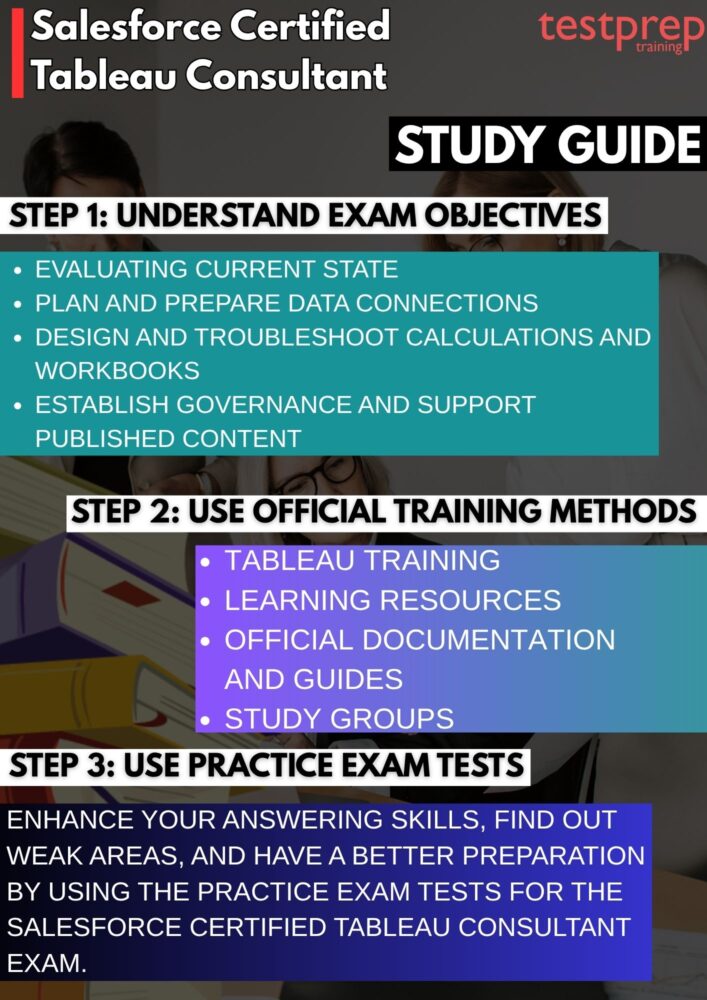
1. Analyze the Exam Guide and Objectives
Start by thoroughly examining the official exam guide, as it defines the scope and depth of what you will be tested on. Break down each domain and understand its relative weight in the exam to prioritize high-impact areas such as performance optimization, governance, and solution design. Go beyond just reading—map each objective to your current knowledge level and identify gaps. Creating a structured study plan aligned with these objectives ensures focused preparation and prevents unnecessary effort on low-priority topics. Revisiting the guide periodically during your preparation will help you track progress and stay aligned with exam expectations.
2. Build a Strong Foundation with Tableau Training
Invest time in structured learning through official Tableau and Salesforce training programs. These learning paths are specifically designed to simulate real-world use cases, covering everything from data preparation and visualization to advanced topics like scalability and server architecture. Instead of passively consuming content, actively practice alongside the training by replicating examples and experimenting with variations. Focus on understanding why certain techniques are used, not just how they are implemented. This approach builds deeper conceptual clarity, which is essential for tackling scenario-based questions in the exam. However, the exam related learning paths include:
3. Use Curated Learning Resources for Each Domain
To gain a well-rounded understanding, compile a set of high-quality resources for each exam domain. This can include expert blogs, Tableau community articles, whitepapers, and recorded webinars. Organize these resources topic-wise—such as data modeling, dashboard design, performance tuning, and governance—to create a structured learning repository. Comparing multiple sources helps you understand different approaches to solving the same problem, which is particularly useful for consultant-level roles. Additionally, incorporating real-world case studies can provide insights into how Tableau solutions are implemented in enterprise environments.
4. Refer to Official Documentation and Guides
Official Tableau and Salesforce documentation should be a core part of your preparation strategy. These resources provide detailed explanations of features, configurations, and best practices directly from the source. Focus on areas such as Tableau Server/Cloud architecture, data connectivity options, security models, and performance optimization techniques. Tip sheets and user guides often include practical recommendations that are highly relevant for exam scenarios. Make it a habit to explore documentation when you encounter unfamiliar concepts, as this reinforces learning with accurate and up-to-date information.
5. Engage with Study Groups and Professional Communities
Participating in Tableau communities and study groups can significantly enhance your preparation experience. Platforms such as forums, discussion boards, and professional networks allow you to interact with other candidates and experienced consultants. Engaging in discussions helps clarify complex topics, exposes you to different problem-solving approaches, and keeps you updated on best practices. You can also benefit from shared resources, study plans, and real exam experiences. Teaching or explaining concepts to others within these communities further strengthens your own understanding.
6. Practice with Mock Exams and Sample Questions
Regular practice is essential to build confidence and improve exam performance. Use mock exams and sample questions to familiarize yourself with the exam format, including multiple-choice and multi-select questions. Simulate real exam conditions by timing yourself and avoiding distractions. After each practice test, conduct a detailed review of your answers—especially incorrect ones—to understand the underlying concepts and avoid repeating mistakes. Over time, this process helps you identify patterns in questions and strengthens your ability to make accurate decisions under time constraints.
7. Reinforce Learning Through Revision and Hands-On Practice
Consistent revision combined with practical application is key to mastering the exam content. Work on hands-on projects using Tableau tools such as Desktop, Prep, and Server/Cloud to apply theoretical knowledge in real scenarios. Focus on building dashboards, optimizing performance, managing data sources, and implementing governance practices. Revisit previously studied topics regularly to reinforce retention and connect concepts across different domains. This combination of revision and real-world practice ensures you are not only prepared to pass the exam but also capable of performing effectively in a professional Tableau Consultant role.
