
Salesforce Certified Tableau Architect

The Salesforce Certified Tableau Architect credential is designed for professionals who specialize in building and managing enterprise-grade Tableau environments. These experts work closely with organizations to design, deploy, and optimize scalable Tableau platforms that align with business goals and industry best practices.
A Tableau Architect plays a critical role in ensuring that data visualization systems are not only functional but also secure, high-performing, and capable of handling growth. From initial architecture planning to long-term maintenance, they ensure that the Tableau ecosystem delivers consistent value across the organization.
This certification validates a candidate’s ability to architect robust Tableau solutions across various environments. It focuses on both strategic design and hands-on implementation, ensuring that certified professionals can handle real-world challenges in enterprise deployments. Key areas covered include:
- Designing scalable Tableau architectures
- Deploying and configuring Tableau Server and Tableau Cloud
- Monitoring system performance and reliability
- Managing upgrades, migrations, and maintenance
- Implementing governance and security best practices
Skills and Expertise Validated
The Salesforce Certified Tableau Architect certification recognizes individuals who possess a strong combination of technical knowledge and practical experience. It confirms the ability to:
- Architect complex Tableau Server deployments in enterprise environments
- Plan and execute migrations to Tableau Cloud
- Ensure platform scalability and performance optimization
- Implement data governance and security frameworks
- Automate processes and integrate Tableau with external systems
Target Audience
This certification is intended for experienced professionals who take on strategic and technical leadership roles in Tableau projects. Typical candidates include:
- Tableau Technical Architects
- Senior Tableau Administrators
- Data Platform Architects
- BI Solution Architects
Role and Responsibilities
A Salesforce Certified Tableau Architect is expected to handle a wide range of responsibilities across the Tableau ecosystem, including:
- Designing end-to-end Tableau architecture for enterprise use
- Leading Tableau Server deployments and Tableau Cloud migrations
- Integrating Tableau with other enterprise tools and data sources
- Establishing governance policies and security frameworks
- Managing scalability, performance tuning, and system optimization
- Implementing automation for administrative and operational tasks
Experience Requirements
While there are no formal prerequisites for the exam, successful candidates typically have:
- At least 2 years of hands-on experience with Tableau administration
- Strong familiarity with Tableau Server, Tableau Cloud, and Tableau Bridge
- Experience designing Tableau solutions in distributed environments
These environments may include:
- Public cloud platforms
- Private cloud infrastructure
- On-premises deployments
Additionally, candidates are expected to have practical experience in architecting at least one enterprise-level Tableau Server environment.
Exam Details
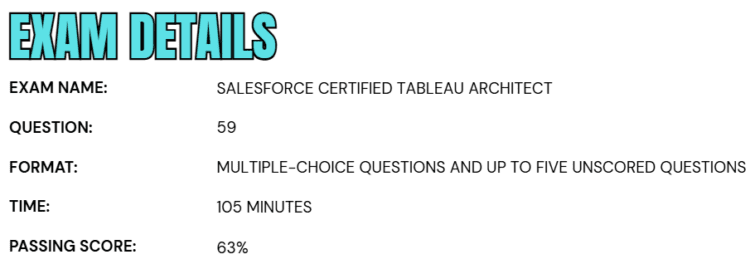
- The Salesforce Certified Tableau Architect exam is a comprehensive assessment designed to evaluate a candidate’s expertise in architecting and managing enterprise-level Tableau environments.
- The exam consists of 59 multiple-choice questions, along with up to five additional unscored questions that are included for research and performance analysis purposes. These unscored questions are randomly distributed throughout the exam and do not affect the final result.
- Candidates are given 105 minutes to complete the exam, requiring both strong conceptual understanding and efficient time management. To successfully pass, a minimum score of 63% is required.
- The exam is offered in a proctored format, which can be taken either at an authorized testing center or through an online proctored environment, providing flexibility based on the candidate’s preference. It is important to note that this is a closed-book exam, meaning that no reference materials—whether physical or digital—are permitted during the test.
- Overall, the exam is structured to rigorously assess a candidate’s practical knowledge, architectural decision-making skills, and ability to implement scalable and secure Tableau solutions in real-world scenarios.
Course Outline
The Salesforce Certified Tableau Architect exam covers the following topics:
1. Learn about designing a Tableau Infrastructure: 22%
1.1 Gathering requirements for implementing a complex Tableau deployment
- Evaluating requirements for users and their role distributions
- Identifying relevant constraints and requirements, including future growth
- Identifying requirements for and recommend a strategy for licensing, including Authorization-to-Run (ATR)
- Assessing the need for high availability and disaster recovery
- Mapping the features and capabilities of the Tableau Server Add-Ons to requirements
1.2 Planning and implementing Tableau Cloud
- Planning and implementing Tableau Bridge
- Planning and implementing authentication
- Plan and implement automated user provisioning, including System for Cross-Domain Identity Management (SCIM)
- Troubleshooting advanced configuration issues
- Planning and implementing multi-sites using Tableau Cloud Manager
1.3 Planning a migration
- Planning a migration of Tableau Cloud to Tableau Server
- Plan a migration of Tableau Server to Tableau Cloud
- Planning a migration from Windows to Linux
- Planning a migration from Linux to Windows
- Plan a migration from one identity store to another
- Planning a consolidation of multiple Tableau servers or sites into fewer servers or sites
- Planning a migration from one Tableau Server environment to another
- Creating scripts for migration
- Using the Tableau Content Migration Tool
1.4 Designing an appropriate process topology
- Specifying process counts (sizing)
- Specifying node count
- Specify service-to-node relationships (node roles), including service isolation and service colocation
- Specifying when to use external services
1.5 Recommending a Tableau Server configuration
- Recommending an appropriate identity store and authentication configuration
- Recommend specific configuration keys and values to suit a given use case
- Recommending a configuration to address security requirements such as encryption at rest and encryption over the wire
- Recommending hardware and network specifications
- Creating a disaster recovery strategy
2. Understand about Deploying Tableau Server: 37%
2.1 Implementing production-ready Tableau Server deployments
- Deploying and configuring Tableau Server
- Configuring an external file store
- Configure an external repository
- Configuring an external gateway
- Configuring an unlicensed node
- Configure a coordination ensemble
- Configuring a backgrounder process with a specific node role
- Configuring Tableau for a load balancer
- Installing in an air-gapped environment
- Validating a disaster recovery/high availability test strategy
- Performing a blue-green deployment
- Locating and interpreting Tableau Server installation logs
- Installing and configuring Resource Monitoring Tool server and agents
- Planning and implementing automated deployment (using a script, that is, Silent Installer)
2.2 Configuring and troubleshooting supported authentication methods
- Configuring and troubleshooting SAML
- Configuring and troubleshooting Kerberos
- Configuring and troubleshooting OpenID Connect
- Configuring and troubleshooting Mutual SSL
- Configuring and troubleshooting trusted authentication
- Configure and troubleshoot Connected App authentication
- Configure and troubleshoot LDAP
- Configure and troubleshoot Azure Active Directory
- Identifying dependencies between authentication methods and Tableau environments, including Tableau Cloud

2.3 Implementing encryption
- Implementing SSL encryption
- Implement database encryption
- Implementing extract encryption
- Set up service principal names (SPNs) for Kerberos
2.4 Installing and verifying Tableau Server on Linux
- Installing Tableau Server on Linux by using CLI or the Installation Wizard
- Identify and resolve issues with installation on Linux
- Identifying and resolving issues with operating system and networking configurations
- Identifying and resolving issues with interfaces and interactions with external systems
- Identify and resolve issues with proxy issues
- Identifying appropriate operating system logs and Tableau logs for troubleshooting
- Verifying system groups and file system permissions
2.5 Installing and verifying Tableau Server on Windows
- Installomg Tableau Server on Windows by using CLI or the Installation Wizard
- Identifying and resolving issues with installation on Windows
- Identify and resolve issues with operating system and networking configurations
- Identifying and resolving issues with interfaces and interactions with external systems
- Identifying and resolving proxy issues
- Identifying appropriate operating system logs and Tableau logs for troubleshooting
- Verifying system groups and file system permissions
- Using the Run As service account
3. Process of Monitoring and Maintaining a Tableau Deployment: 41%
3.1 Creating custom administrative views
- Interpreting the repository schema and the event types
- Building admin dashboards for common scenarios
- Utilizing Admin Insights on Tableau Cloud
3.2 Performing load testing
- Recommending a load testing strategy
- Configuring and using a load testing tool such as TabJolt
- Configuring a test environment
- Creating appropriate test plans
- Interpreting load test results and determine the appropriate action
3.3 Identifying and resolving performance bottlenecks
- Troubleshooting complex performance issues related to workbooks, data sources, and other types of content
- Performing resource analysis, latency analysis, and workload analysis to determine root cause of performance issues
- Creating an action to resolve issues identified in performance recordings
- Optimizing caching for Tableau Server
3.4 Maintaining and tuning a Tableau Server environment by using observability data
- Mapping the features and capabilities of the Tableau Server Resource Monitoring Tool to observability requirements
- Recommending a strategy for collecting and analyzing Tableau Server logs
- Recommend a strategy for collecting and analyzing Tableau Server process metrics
- Recommending a strategy for collecting and analyzing operating system and hardware-related metrics
- Interpreting observability data
- Revising architecture based on observability data
- Troubleshooting connectivity in a single or multi-node environment, especially database connectivity
- Configuring and implementing Activity Log for Tableau Cloud or Tableau Server
3.5 Automating server maintenance functions
- Managing and changing Tableau Server resources programmatically, including Tableau Services Manager (TSM), REST APIs, and tabcmd
- Recommending a script deployment method, including Windows Scheduler and cron
- Recommending automated deployment methods for Tableau Server, Tableau Desktop, and Tableau Prep
- Designing an automated complex disaster recovery process
- Planning and implementing multi-node server upgrades
- Automating maintenance tasks, such as cleanup and backup
- Configuring and using the Metadata API
3.6 Managing server extensions
- Scheduling content automation tasks by using webhooks, tabcmd, REST, or Hyper APIs
- Implementing and configuring dashboard extensions and web data connectors
- Configuring trusted tickets and connected apps for a custom embedded solution
Salesforce Certified Tableau Architect Exam FAQs
Salesforce Certification Candidate Code of Conduct
At Salesforce, trust is the highest priority, and maintaining the integrity of its certification program is a shared responsibility. All candidates participating in the Salesforce Certification Program are required to review and accept the Certification Program Agreement and Code of Conduct at the start of each exam. This ensures that every candidate adheres to ethical standards and helps protect the credibility and value of Salesforce certifications worldwide.
Rescheduling and Cancellation Policy
– Testing Center (Onsite) Exam
Candidates who have scheduled their exam at a physical testing center must make any changes—whether rescheduling or cancellation—at least 48 hours before the scheduled exam time. This is a strict 48-hour requirement and is not calculated as two business days.
If changes are made within the permitted timeframe, candidates can update their appointment through their Pearson VUE account without incurring any additional charges. However, failure to attend the exam without prior notice will be treated as a no-show, resulting in the forfeiture of the full exam fee.
– Online Proctored Exam
For exams conducted in an online proctored environment, candidates are required to reschedule or cancel their appointment at least 24 hours in advance. This policy follows a strict 24-hour window rather than a business-day calculation.
Any modifications made within this timeframe can be completed through the Pearson VUE platform at no extra cost. Adhering to these guidelines ensures a seamless exam experience while helping candidates avoid unnecessary penalties or additional fees.
Salesforce Certified Tableau Architect Exam Study Guide
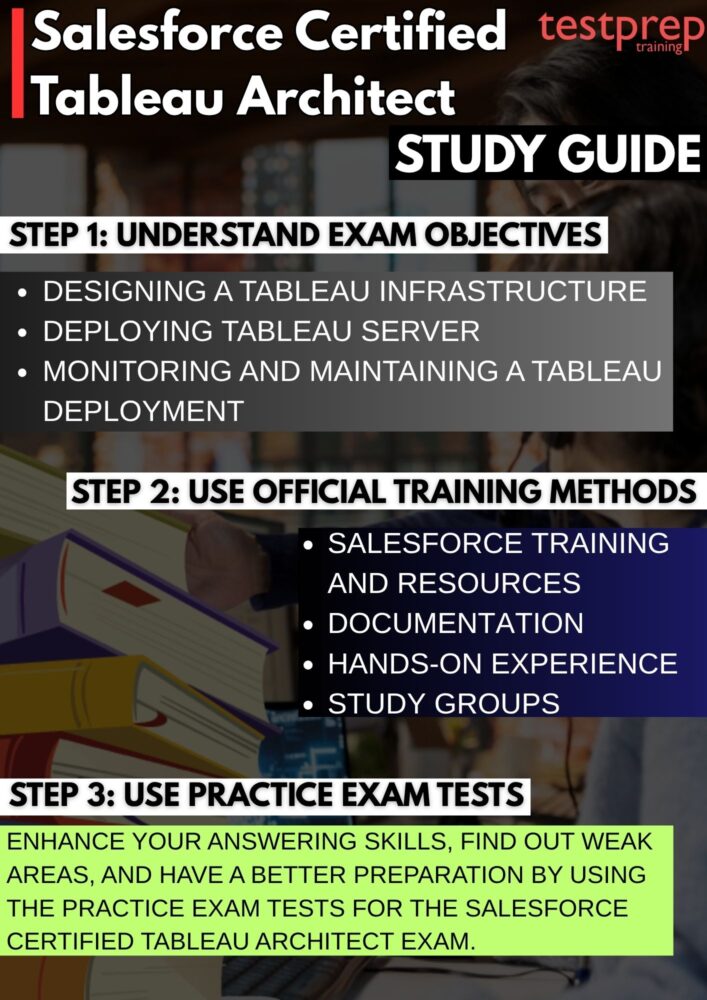
1. Thoroughly Understand the Exam Guide and Objectives
Start your preparation by carefully analyzing the official exam guide, as it serves as the blueprint for everything you need to study. Break down each domain and review the percentage weight assigned to topics such as architecture design, governance, security, scalability, performance optimization, and Tableau Cloud/Server integration.
Go beyond just reading the objectives—interpret what each skill area actually requires in real-world scenarios. For example, understanding “scalability” should include knowledge of distributed deployments, load balancing, and resource planning. Create a checklist of all topics and rate your proficiency (beginner, intermediate, advanced). This gap analysis will help you focus on weaker areas and avoid wasting time on topics you already know well.
2. Follow Structured Tableau Learning Paths
Rely on structured and official learning paths to build a solid and organized foundation. Tableau and Salesforce provide curated training modules that cover everything from basic administration to advanced architecture concepts. Focus on learning paths that include:
- Tableau Server architecture and deployment models
- Tableau Cloud migration strategies
- Site Admin
- Server Admin
- Server Architect
- Data connectivity and integration techniques
- Security models (authentication, authorization, row-level security)
- Performance tuning and optimization
Move step-by-step rather than jumping between topics. Take notes, summarize key learnings, and revisit complex modules multiple times. Structured learning ensures you don’t miss critical concepts and helps build knowledge progressively from fundamentals to advanced topics.
3. Leverage Official Documentation, Whitepapers, and Technical Guides
Official documentation is one of the most important resources for this exam, as many questions are based on real-world implementation scenarios and best practices. Dive deep into:
- Tableau Server and Tableau Cloud documentation
- Architecture and deployment whitepapers
- Performance tuning guides
- Governance and security best practices
- Upgrade and migration documentation
Pay special attention to diagrams, architecture patterns, and recommended configurations. These materials often explain why certain approaches are preferred, which is crucial for answering scenario-based questions. Create short summaries or cheat sheets for topics like node roles, backgrounder processes, caching mechanisms, and extract strategies.
4. Build Strong Hands-On Experience
This is not a theory-only exam—practical experience is essential. Try to work in a real or simulated Tableau environment where you can practice key tasks such as:
- Installing and configuring Tableau Server
- Setting up multi-node or distributed environments
- Managing users, permissions, and authentication methods
- Monitoring system performance and logs
- Performing upgrades and migrations to Tableau Cloud
- Automating processes using scripts or APIs
If you don’t have access to a production setup, use trial environments or lab setups. The goal is to understand how different components interact and how to troubleshoot issues. Real-world exposure will help you confidently tackle scenario-based questions in the exam.
5. Participate in Study Groups and Tableau Communities
Joining a community can significantly accelerate your learning. Engage with other candidates and professionals through forums, study groups, and Tableau-focused communities. Benefits include:
- Learning practical tips and real-world use cases
- Getting clarity on complex topics like clustering, high availability, and failover
- Sharing resources, notes, and study strategies
- Staying updated with the latest features and changes
Active participation—asking questions, answering others, and discussing scenarios—reinforces your understanding and exposes you to perspectives you might not encounter while studying alone.
6. Practice with Mock Exams and Scenario-Based Questions
Practice tests are essential for evaluating your readiness and improving exam performance. Use high-quality mock exams that closely resemble the actual test format. While practicing:
- Focus on scenario-based questions that test decision-making skills
- Analyze why an answer is correct or incorrect
- Identify patterns in the types of questions asked
- Track your scores across different domains
Time yourself while attempting mock tests to simulate real exam conditions. This helps improve speed, accuracy, and confidence. Revisit incorrect answers and ensure you fully understand the underlying concept before moving on.
7. Revise Strategically and Strengthen Weak Areas
In the final phase of your preparation, shift your focus to revision and refinement. Go through your notes, summaries, and key concepts, especially in high-weightage areas like architecture design, governance, and performance optimization. Key revision strategies include:
- Reviewing architecture diagrams and deployment scenarios
- Revisiting common mistakes from mock tests
- Memorizing important configurations and best practices
- Practicing quick decision-making for scenario questions
Avoid learning entirely new topics at the last minute. Instead, strengthen what you already know and ensure clarity in all core areas. A well-structured revision plan will boost your confidence and help you perform effectively on exam day.
