
Exam AB-250: Dynamics 365 Contact Center AI Engineer Associate

The Microsoft Certified: Dynamics 365 Contact Center AI Engineer Associate certification validates your ability to design, implement, and optimize AI-powered contact center solutions using Microsoft Dynamics 365. It demonstrates expertise in creating scalable customer service environments that combine human support teams with intelligent AI-driven capabilities.
Who Should Take This Certification?
This certification is designed for contact center engineers, solution architects, and customer service professionals who build and support modern contact center solutions. Candidates are expected to translate business requirements into efficient, secure, and well-governed service experiences powered by Dynamics 365 Contact Center and autonomous AI technologies.
Key Responsibilities of a Contact Center AI Engineer
As a Dynamics 365 Contact Center AI Engineer, you will be responsible for:
- Configuring customer engagement channels and service workstreams.
- Designing and implementing intelligent routing strategies.
- Managing service representative profiles and workspace experiences.
- Enabling productivity tools, including AI-powered assistance through Microsoft Copilot.
- Deploying self-service solutions and virtual agents for customer support.
- Identifying opportunities to leverage autonomous agents for service automation.
- Monitoring contact center performance and driving continuous improvement.
- Resolving operational issues and maintaining service quality.
- Implementing proactive engagement capabilities such as outbound communications and customer journeys.
- Configuring workforce management features, including forecasting, scheduling, and skills-based resource allocation.
Collaboration and Governance
Professionals in this role work closely with customer service leaders, contact center managers, IT teams, and compliance stakeholders. They help ensure that contact center solutions align with business objectives while following responsible AI practices, security requirements, data protection standards, and organizational governance policies.
Recommended Knowledge and Experience
Candidates preparing for the AB-250 exam should have:
- Experience with Contact Center as a Service (CCaaS) solutions.
- Knowledge of voice, digital, social, and omnichannel customer engagement.
- Familiarity with key contact center roles, including agents, supervisors, and administrators.
- Understanding of AI-powered self-service and agent-assist technologies.
- Experience supporting environments focused on service efficiency, routing optimization, and agent productivity.
- Awareness of supervisor workflows, monitoring activities, and performance management.
Supporting Microsoft Technologies
Successful candidates should also be familiar with:
- Microsoft Power Platform
- Microsoft Copilot Studio
- Power BI
- Microsoft Teams
- Microsoft Foundry
Exam Details
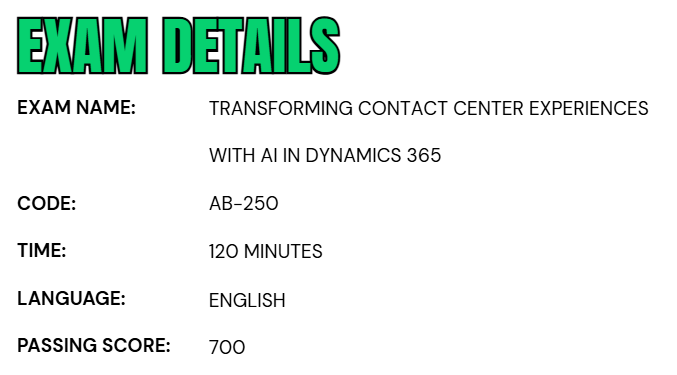
- The Microsoft Certified: Dynamics 365 Contact Center AI Engineer Associate certification is designed for professionals who want to demonstrate their ability to build, configure, and optimize AI-powered contact center solutions using Microsoft Dynamics 365.
- This intermediate-level certification is ideal for individuals working in roles such as Administrator, Business Analyst, Functional Consultant, or Platform Engineer who are involved in delivering modern customer service experiences enhanced by artificial intelligence.
- The AB-250 exam evaluates your knowledge of contact center operations, intelligent routing, workforce management, customer engagement channels, AI-powered self-service solutions, and autonomous agent capabilities within Dynamics 365 Contact Center. It focuses on real-world skills required to design and manage customer service environments that improve efficiency, enhance agent productivity, and deliver exceptional customer experiences.
- Candidates are given 120 minutes to complete the assessment. The exam is proctored, meaning it is monitored to help maintain exam integrity and security standards.
- Depending on the exam content, you may also encounter interactive tasks or scenario-based activities that assess your ability to apply concepts in practical situations rather than relying solely on theoretical knowledge.
- Currently, the exam is available in English.
- Microsoft also provides support for candidates who require special accommodations. Individuals using assistive technologies, requiring additional testing time, or needing modifications to the standard exam experience can request accommodations to ensure an accessible and fair testing environment.
Course Outline
The AB-250 exam covers the following topics:
1. Deploying Dynamics 365 Contact Center (15–20%)
Implementing Dynamics 365 Contact Center
- Configuring the Copilot Service workspace (Microsoft Documentation: Get started with Copilot Service workspace, Manage Copilot features in Customer Service, Use Copilot Service workspace)
- Configuring and extending connectors for Dynamics 365 Contact Center (Microsoft Documentation: Configure the connector for any CRM solution, Extend Dynamics 365 Contact Center, Configure and enable connectors)
- Configuring embedded Dynamics 365 Contact Center mode
- Configuring Copilot for third-party CCaaS solutions (Microsoft Documentation: Contact center using existing CRM and CCaaS solution)
- Enabling agent simulation to evaluate journeys (Microsoft Documentation: Validate criteria using Quality Evaluation Agent simulation, Manage Quality Evaluation Agent)
- Enabling the Health Agent to proactively investigate issues
- Enabling agents to perform transformation, environment migration, and configuration (Microsoft Documentation: Migrate Copilot Studio survey agents configurations)
Deploying Dynamics 365 Contact Center
- Managing and rolling out agents by using the Agent hub (Microsoft Documentation: Create rollout plans to manage AI agents, Overview of agent hub)
- Creating solutions for Dynamics 365 Contact Center deployments (Microsoft Documentation: Dynamics 365 Contact Center)
- Configuring application lifecycle management (ALM) for Dynamics 365 Contact Center deployments (Microsoft Documentation: Application lifecycle management for Dynamics 365, Best practices for ALM in Dynamics 365 applications)
- Managing an omnichannel environment (Microsoft Documentation: Manage omnichannel environments)
- Configuring user settings
- Creating user accounts
- Managing security roles, including custom security roles and personas (Microsoft Documentation: Manage personas and custom security roles in Customer Service)
- Managing capacity profiles (Microsoft Documentation: Create and manage capacity profiles)
2. Implementing channels (30–35%)
Configuring chat and digital channels
- Configuring the chat channel (Microsoft Documentation: Configure persistent chat)
- Configuring the record-based channel (Microsoft Documentation: Set up unified routing for records, Set up rules to automatically create or update records in the legacy app)
- Configure digital channels (Microsoft Documentation: Configure chat and digital channels, Configure channels in Dynamics 365 Contact Center)
- Configuring and embedding a chat widget (Microsoft Documentation: Configure a chat widget, Embed chat widget in your website or portal)
- Configure proactive chat (Microsoft Documentation: Configure proactive chat)
- Configuring pre-chat surveys (Microsoft Documentation: Configure a preconversation survey)
- Managing quick replies (Microsoft Documentation: Create quick replies, Enable personal quick replies for representatives)
- Extending the chat experience using the live chat SDK (Microsoft Documentation: Live chat SDK Reference)
- Configuring authentication settings for chat (Microsoft Documentation: Configure authentication settings)
- Managing chat in native mobile apps by using the Messaging SDK for Dynamics 365 Contact Center (Microsoft Documentation: Add messaging to native mobile apps, Customize live chat widgets for mobile apps)
- Configuring a custom messaging channel by using messaging APIs (Microsoft Documentation: Configure a custom messaging channel using messaging APIs, Configure custom messaging channels)
- Enabling real-time translation of conversations (Microsoft Documentation: Enable real-time translation of conversations)
- Configuring customer settings, including location and self-service settings (Microsoft Documentation: Enable self-service settings)
Provisioning and managing the voice channel
- Configuring the voice channel (Microsoft Documentation: Introduction to the voice channel, Configure the voice channel)
- Integrating a non-Microsoft interactive voice response (IVR) system with voice channel (Microsoft Documentation: Integrate a non-Microsoft IVR system with voice channel)
- Managing phone numbers (Microsoft Documentation: Manage phone numbers)
- Configuring inbound and outbound calling profiles (Microsoft Documentation: Configure outbound and inbound profiles)
- Configuring call recording, transcription, and real-time translation (Microsoft Documentation: Configure call recording, transcription, and real-time translation)
- Configuring agent feedback
- Managing voice calls via the CCaaS SDK API
- Managing context variables (Microsoft Documentation: Manage context variables)
- Configuring automatic customer identification (Microsoft Documentation: Identify customers automatically)
- Closing conversations automatically (Microsoft Documentation: Close conversations automatically)
- Enabling consult with representatives and transfer of conversations (Microsoft Documentation: Enable consult with representatives and transfer of conversations)
- Configuring sensitive data masking
- Configuring custom presences (Microsoft Documentation: Configure and manage custom presence)
- Configuring messages, including templates, formatting, automated messages, and outbound messages (Microsoft Documentation: Configure outbound messaging, Configure automated messages)
- Managing active conversation settings (Microsoft Documentation: Manage enhanced Active Conversation settings)
- Configuring the timeline
- Using custom connectors with the timeline control
- Configuring the channel integration framework (Microsoft Documentation: Dynamics 365 Channel Integration Framework guide)
- Managing conversations (Microsoft Documentation: Manage all ongoing conversations)
- Configuring feedback by using Copilot Studio (Microsoft Documentation: Configure feedback surveys using Copilot Studio)
- Managing file attachments (Microsoft Documentation: Enable file attachments)
- Managing proactive outbound engagement (Microsoft Documentation: Configure proactive engagement, Overview of proactive engagement)
- Configuring proactive outbound campaigns, including workstreams and triggers (Microsoft Documentation: Run voice outbound campaigns with proactive engagement)
- Configuring dialing methods for proactive outbound campaigns (Microsoft Documentation: Dial modes for proactive engagement, Configure outbound dialer settings)
- Setting up the proactive outbound dashboard (Microsoft Documentation: Proactive Outbound dashboard)
- Configuring Workforce management (WFM)
- Configuring shift management and scheduling (Microsoft Documentation: Shift management and staff scheduling)
- Configuring forecasting (Microsoft Documentation: Enable volume forecasting for supervisors)
- Integrating third-party WFM solutions (Microsoft Documentation: Orchestrate your WFM solution)
- Designing the Dynamics 365 Contact Center setup (Microsoft Documentation: Welcome to Dynamics 365 Contact Center)
- Using best practices when setting up voice (Microsoft Documentation: Best practices for setting up the voice channel)
- Using best practices for developing AI capabilities
- Evaluating the total cost of ownership for a Dynamics 365 Contact Center implementation

3. Configuring agents and AI capabilities (10–15%)
Configuring agent assist capabilities in Dynamics 365 Contact Center
- Configuring Copilot summaries (Microsoft Documentation: Configure Copilot summaries in Field Service)
- Configuring the Ask a question feature (Microsoft Documentation: Ask a question)
- Configure knowledge sources for Copilot in Dynamics 365 Customer Service (Microsoft Documentation: Enable knowledge sources from Microsoft Copilot Studio)
- Extending Copilot capabilities with prompt plugins and tools (Microsoft Documentation: Extend Copilot capabilities with plugins )
- Interpreting the Copilot analytics report (Microsoft Documentation: View Copilot analytics report)
- Creating a smart assist bot (Microsoft Documentation: Build a smart assist agent)
- Configuring IVR with voice agents by using generative AI or classic orchestration (Microsoft Documentation: Set up IVR agents in the voice channel using Copilot Studio)
- Managing variables in Copilot Studio (Microsoft Documentation: Work with variables)
- Securing the Dynamics 365 Contact Center voice channel (Microsoft Documentation: Introduction to the voice channel)
- Configuring compliant call recording in Copilot Studio
- Configuring SIP header transfers (Microsoft Documentation: Configure SIP X-headers for voice-enabled agents)
- Configuring the Real-time Speech agent (Microsoft Documentation: Configure real-time voice agents)
- Configuring dual-tone multi-frequency (DTMF), natural language understanding (NLU), and speech-based IVR
- Configure Copilot Studio voice triggers
- Implementing best practices for configuring voice agents (Microsoft Documentation: Best practices for configuring AI agents)
- Configuring multilingual voice agents (Microsoft Documentation: Configure multilingual voice agents)
4. Configuring work distribution (10–15%)
- Creating and managing queues (Microsoft Documentation: Create and manage basic queues for cases, Create and manage queues for unified routing)
- Configuring queue prioritization
- Configuring overflow and fallback (Microsoft Documentation: Manage overflow of work items in queues)
- Configure work assignment methods (Microsoft Documentation: Configure assignment methods and rules for queues, Configure work assignment)
- Setting up operating hours (Microsoft Documentation: Create and manage operating hours)
Configuring basic and unified routing
- Configuring workstreams, including configuring context variables and associating agents in Copilot Studio (Microsoft Documentation: Configure context variables for AI Agents)
- Configure work classification rules (Microsoft Documentation: Configure work classification rulesets for unified routing)
- Configuring the engagement agent
- Configuring skills-based routing (Microsoft Documentation: Overview of skill-based routing)
- Configure AI-enabled skills-based routing
- Configuring intent-based routing (Microsoft Documentation: Configure intent-driven routing)
- Configuring preferred representative routing (Microsoft Documentation: Configure routing to preferred representatives)
- Configuring routing for records
- Configure basic routing rule sets (Microsoft Documentation: Route cases using basic routing rulesets)
- Diagnosing unified routing by using conversation diagnostics (Microsoft Documentation: Understand unified routing diagnostics data)
5. Configuring the Dynamics 365 Contact Center representative experience (15–20%)
Configuring experience profiles
- Creating experience profiles (Microsoft Documentation: Create and use experience profiles)
- Configuring application tab templates (Microsoft Documentation: Manage application tab templates)
- Configuring the agent inbox, including creating custom views (Microsoft Documentation: Configure the inbox)
- Configuring session templates (Microsoft Documentation: Manage session templates)
- Configuring notification template (Microsoft Documentation: Manage notification settings and templates)
Configuring productivity tools
- Enabling custom productivity panels (Microsoft Documentation: Manage custom productivity tools)
- Configuring scripts, including slugs (Microsoft Documentation: Guide representatives with scripts)
- Creating macros
- Enabling Teams collaboration (Microsoft Documentation: Microsoft Teams collaboration)
- Extending the productivity panel by using the app profile manager JavaScript API reference (Microsoft Documentation: App profile manager JavaScript API Reference)
- Extending the customer service representative experience by using the Omnichannel JavaScript API (Microsoft Documentation: Omnichannel JavaScript API Reference)
Creating and administering knowledge management
- Configuring internal knowledge search capabilities (Microsoft Documentation: Configure knowledge management)
- Integrating and searching external knowledge sources (Microsoft Documentation: Knowledge sources summary, Set up external search providers)
- Configuring tables for knowledge management
- Configuring the Customer Knowledge Management agent (Microsoft Documentation: Manage Customer Knowledge Management Agent
- Integrating knowledge into portals (Microsoft Documentation: Integrate knowledge management in Dynamics 365 with Copilot agents)
6. Managing analytics for the Dynamics 365 Contact Center (10–15%)
Configuring the Dynamics 365 Contact Center supervisor experience
- Configuring supervisor settings
- Configuring the Quality Evaluation agent (Microsoft Documentation: Manage Quality Evaluation Agent)
- Configuring access to analytics and dashboards (Microsoft Documentation: Configure analytics and insights dashboards)
- Performing supervisor actions for conversations (Microsoft Documentation: Enable supervisor access to manage conversations)
- Configuring the supervisor app
Customizing analytics and reporting
- Customizing the key performance indicators (KPIs) in the analytics reports by using the embedded Power BI editor (Microsoft Documentation: Create key performance indicator (KPI) visualizations)
- Embedding out-of-the-box reports in the Copilot Service workspace app (Microsoft Documentation: Use the out-of-the-box data model in your custom reports, Customize embedded reports in analytical workspaces)
- Customizing historical and real-time analytics reports by using Power BI (Microsoft Documentation: Customize data models of historical and real-time analytics reports)
- Extending historical and real-time analytics reports by using Power BI Desktop
- Configuring conversation diagnostics in Application Insights (Microsoft Documentation: Configure Conversation diagnostics)
- Configuring and embedding telemetry and analytics from Application Insights
Exam AB-250: Dynamics 365 Contact Center AI Engineer Associate FAQs
Certification Exam Policies
Microsoft certification exams follow a set of official policies that help ensure a secure, consistent, and fair testing experience for all candidates. Before booking an exam, it is important to review the certification requirements, identity verification rules, testing regulations, and candidate responsibilities. Becoming familiar with these policies beforehand can help you avoid unexpected issues related to registration, exam delivery, or appointment management.
– Exam Retake Guidelines
If you do not achieve a passing score on your first attempt, Microsoft allows you to retake the exam according to its established retake policy. In most cases, candidates must wait at least 24 hours before scheduling a second attempt. After the second unsuccessful attempt, a 14-day waiting period generally applies before each additional retake.
Microsoft also limits the number of attempts for the same certification exam to five within a 12-month period. Once you have successfully passed an exam, additional attempts are typically not permitted unless Microsoft introduces a specific renewal, update, or recertification pathway. Keep in mind that every exam attempt requires a new registration and exam fee unless you are using a valid voucher, discount, or promotional benefit.
Microsoft AB-250 Exam Study Guide
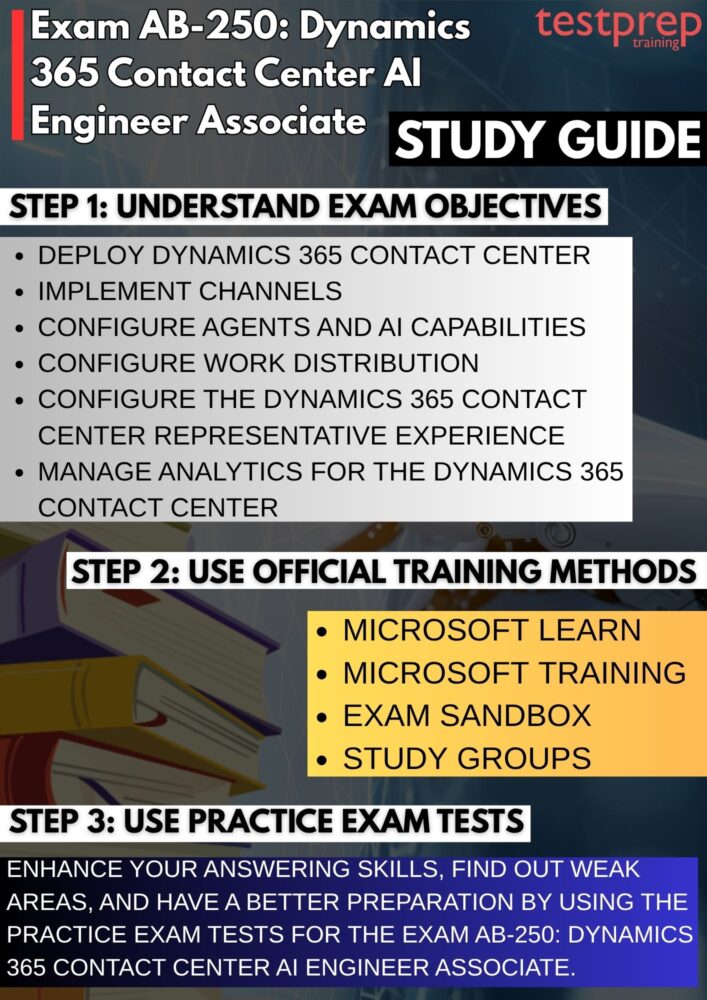
Step 1: Review the Official Exam Skills Outline
Begin your preparation by carefully studying the official AB-250 exam objectives. The skills outline provides a detailed breakdown of the topics measured in the exam and highlights the knowledge areas Microsoft expects candidates to master. Pay close attention to domains such as contact center configuration, intelligent routing, workforce management, AI-powered self-service, autonomous agents, customer engagement channels, and service optimization. Understanding the exam blueprint helps you prioritize your study efforts and identify areas that may require additional attention.
Step 2: Build a Strong Foundation in Dynamics 365 Contact Center
Before diving into advanced topics, ensure you have a solid understanding of Dynamics 365 Contact Center fundamentals. Familiarize yourself with contact center architecture, customer service workflows, agent experiences, supervisor capabilities, omnichannel communication, and AI-assisted service operations. A strong foundation makes it easier to understand how various components work together to deliver modern customer support experiences.
Step 3: Complete the Microsoft Learn Learning Paths
Microsoft Learn should serve as the primary study resource for the AB-250 exam. Work through all recommended learning paths, modules, and hands-on exercises related to Dynamics 365 Contact Center, Copilot capabilities, customer service automation, workforce management, and autonomous agents. The structured learning content aligns closely with exam objectives and provides practical knowledge that can be applied in real-world implementations as well as exam scenarios. However, the related training course includes:
– Transform Contact Center Experiences with AI in Dynamics 365 (AB-250T00-A)
The AB-250T00-A: Transform Contact Center Experiences with AI in Dynamics 365 course helps learners develop the skills needed to configure and manage intelligent contact center solutions using Microsoft Dynamics 365 and integrated AI capabilities. It covers key topics such as contact center deployment, channel configuration, user and security management, routing strategies, Copilot features, and AI-powered customer service experiences.
Designed for intermediate-level implementation professionals, this course is ideal for individuals responsible for designing, configuring, and deploying contact center solutions. Learners gain practical knowledge of work distribution, customer engagement channels, and AI-assisted capabilities, enabling them to build scalable contact center environments that improve agent productivity, customer satisfaction, and operational efficiency.
Step 4: Gain Hands-On Experience with the Platform
Practical experience is essential for success in the AB-250 certification exam. Spend time working in a Dynamics 365 Contact Center environment where you can configure workstreams, create routing rules, manage engagement channels, implement AI-powered self-service solutions, and explore workforce management features. Hands-on practice helps reinforce theoretical concepts and prepares you for scenario-based questions that require real-world problem-solving skills.
Step 5: Explore the Exam Sandbox Environment
Before exam day, use Microsoft’s Exam Sandbox to become familiar with the testing interface. The sandbox allows you to experience the same exam environment used during the actual certification assessment and interact with different question formats. Understanding the navigation tools, review options, case-study layouts, and interactive question types can improve your confidence and help you manage your time more effectively during the exam.
Step 6: Participate in Study Groups and Professional Communities
Joining certification-focused communities can significantly enhance your preparation. Engage with Microsoft certification forums, Dynamics 365 user groups, technical communities, and social learning platforms where candidates discuss exam topics, implementation experiences, and best practices. Community participation exposes you to different perspectives, practical insights, and common challenges that may appear in real-world contact center deployments.
Step 7: Validate Your Knowledge with Practice Tests
As you near exam readiness, use practice assessments to evaluate your understanding of the material. Practice tests help identify knowledge gaps, reinforce key concepts, and improve your ability to answer questions under timed conditions. After each practice session, review both correct and incorrect answers to understand the reasoning behind them. Combining practice exams with targeted revision is one of the most effective ways to increase confidence and improve your chances of passing the AB-250 exam on your first attempt.
