
GH-100: GitHub Administration

The GitHub Administration (GH-100) certification validates your capability to efficiently manage, configure, and optimize a GitHub environment for smooth, secure, and scalable collaboration. Earning this credential demonstrates your proficiency in repository governance, workflow optimization, user and permission management, security policy enforcement, and integration oversight, ensuring successful project delivery across teams. By achieving the GH-100 certification, you showcase your ability to:
- Implement and maintain best practices for GitHub Enterprise Administration.
- Manage repositories, branches, and collaboration settings to support development workflows.
- Configure and enforce security, compliance, and governance measures.
- Optimize workflows for efficiency and reliability in multi-team environments.
The certification remains valid for two years, after which recertification is recommended to ensure alignment with the latest GitHub features and administrative practices.
Who Should Take the Exam?
The GH-100 exam is intended for professionals responsible for managing and supporting GitHub Enterprise environments, including but not limited to:
- System Administrators who oversee GitHub configurations and maintenance.
- Software Developers with administrative responsibilities in collaborative projects.
- Application Administrators managing integrations, workflows, and access control.
- IT Professionals with intermediate-level knowledge of GitHub Enterprise Administration seeking formal validation of their skills.
Candidates are expected to have hands-on experience with GitHub Enterprise features, repository management, security configurations, and team collaboration setups before attempting the exam.
Exam Details
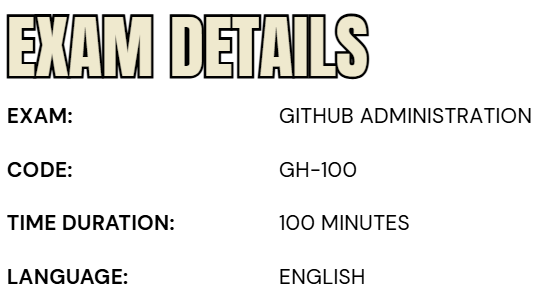
- The GitHub Administration (GH-100) certification is designed for professionals with an intermediate level of expertise in managing and optimizing GitHub environments. It is particularly relevant for individuals serving in roles such as Administrator, DevOps Engineer, or Technology Manager, who are responsible for overseeing repository governance, workflow configuration, and collaboration efficiency across teams.
- Candidates will be allotted 100 minutes to complete the assessment. This is a proctored exam, ensuring the integrity of the certification process. In addition to multiple-choice and knowledge-based items, the exam may include interactive components that require practical demonstration of skills.
- The GH-100 exam is currently offered in English. Most questions will assess knowledge of GitHub features that are in General Availability (GA). However, in cases where Preview features are widely adopted and commonly used, these may also be included in the assessment.
Course Outline
The exam covers the following topics:
Domain 1: Supporting GitHub Enterprise for users and key stakeholders (15%)
Supporting GitHub Enterprise for users and key stakeholders
- Distinguishing problems that can be solved by an administrator from those that need GitHub Support
- Describing how to generate support bundles and diagnostics
- Describing how GitHub’s products and services are used within the enterprise to identify underutilized features, integrations in use, most active teams, and repositories
- Recommending standards for developer workflows, including code collaboration (fork-and-pull versus branching), branching, branch protection rules, code owners, the code review process, automation, and release strategy
- Explaining the tooling ecosystem at the enterprise
- Explaining the enterprise’s CI/CD strategy
- Discuss how to recommend tooling and workflows to teams within an enterprise
- Explain how GitHub APIs can be used to extend the capabilities of the administrator from the user interface, such as querying or storing the audit log
- Locate an asset from the GitHub Marketplace for a specific need (i.e., find the Azure Pipelines GitHub App in the Marketplace, install it, and configure it to deploy your code)
- Contrasting a GitHub App and an action (i.e., their permissions, how they’re built, how they’re consumed)
- List the benefits and risks of using apps and actions from the GitHub Marketplace
Domain 2: Managing user identities and GitHub authentication (20%)
Managing user identities and GitHub authentication
- Listing the implications of enabling SAML single sign-on (SSO) for an individual organization versus all organizations in an enterprise account
- Listing the steps to enable and enforce SAML SSO for a single organization and multiple organizations using enterprise accounts
- Explaining how to require two-factor authentication (2FA) for an organization
- Explain how to choose supported identity providers
- Describing how identity management and authorization works on GitHub
- List the consequences of a user’s membership in the instance, an organization, or multiple organizations
- Describing the authentication and authorization model (specifically, how users get to the system, and how they’re granted access to specific things within GitHub)
- List the supported SCIM providers (Azure, Okta, self-created)
- Describe how the SCIM protocol works and how GitHub supports it
- Describing how Team synchronization works
- Contrast team synchronization and SCIM
Domain 3: Describing how GitHub is deployed, distributed, and licensed (5%)
Contrasting the capabilities of GitHub Enterprise Server (GHES), GitHub Enterprise Cloud (GHEC), and GitHub AE (GHAE)
- Describe GitHub Enterprise Cloud (GHEC)
- Describing GitHub Enterprise Server (GHES)
- Describing GitHub AE
Differentiating how products are billed, including seat licenses, GitHub Actions, and GitHub Packages
- Describing pricing for GitHub Actions
- Describe pricing and support options for organizations
- Describing how to find statistics of license usage for a specific organization
- Describe how to find statistics of license usage for machine accounts and peripheral services
- Explaining the consumption of metered products given a report (i.e., GitHub Actions minutes or storage for GitHub Packages)
Domain 4: Managing access and permissions based on membership (20%)
Defining a GitHub organization
- Explaining the benefits and costs of deploying a single organization versus multiple organizations
- Describe how to set default read permissions versus default write permissions across organizations
- Describing Team sync through AD
- Explain maintainability; writing scripts against multiple orgs and multiple access rights
- Describing how to adjust enterprise policies and organization permissions in alignment with a company’s trust and control position
Describing enterprise permissions and policies
- Defining a GitHub organization
- List the possible roles of an organization member
- Contrasting permissions for organization members, owners, and billing managers
- Describe the difference between being an organization member and an outside collaborator
- Listing the consequences of a user’s membership in an instance or organization
- Explaining how to give a user the minimum required permissions for repository, organization, or team access.
- List the benefits and the drawbacks of creating a new organization
- Define Teams in a GitHub organization
- Listing the possible roles of a team member
- Describing the different permission models
- Explaining the actions of a user given a list of their permissions, such as repository role, team membership, or organization membership (https://github.com/organizations/<ORG_NAME>/settings/member_privileges)
- Listing the repository membership options
- Explain audit access to a repository
Domain 5: Enabling secure software development and ensure compliance (15%)
Enabling secure software development and ensure compliance
- Explaining how GitHub supports the enterprise’s security posture
- Describe scrubbing sensitive data from a Git repository (filter-branch/BFG)
- Describing scrubbing sensitive data from GitHub (contacting support)
- Explaining how to choose a policy based on how much control is required
- Explaining the impacts of choosing a specific set of policies
- Define organization policies
- Defining enterprise policies

Describing how to use the audit log APIs (Rest and GraphQL) to explain a missing asset
- Defining the use case for audit logs
- Describe security and compliance concepts with GitHub
- Explaining how to provide reports for auditing
Defining and explaining the importance of the security features of a GitHub repository
- Explaining the importance of a security policy
- Define a vulnerability
- Describe a vulnerable dependency
- Explaining the importance of secret scanning
- Explain the importance of code scanning
- Describing automated code scanning (CodeQL)
- Explain the dependency graph
- Explain the importance of a security advisory
- Describing Dependabot
- Detect and fix outdated dependencies with security vulnerabilities
- Describing security vulnerability alerts
- Create and implement a security response plan that addresses sensitive data on a GitHub repository
- Describing how to use SSH keys and Deploy keys to access repository data
- Listing supported access tokens (e.g. PAT, Installation Tokens, OAuth and GitHub app OAuth tokens, Device Tokens, Refresh tokens)
- Explain how to find a token’s rate limits
- Describing GitHub Apps, their repository permissions, user permissions, and event subscriptions
- Describe OAuth Apps, their permissions, and event subscriptions
- Contrasting the use of a personal access token (PAT) or a GitHub App for authenticating a machine account
- Describe the use of machine accounts versus GitHub apps
- Explaining how to approve or deny user-created GitHub Apps and OAuth apps based on a security policy
- Define an enterprise managed user (EMU)
Domain 6: Managing GitHub Actions (20%)
Distributing actions and workflows to the enterprise
- Identifying reuse templates for actions and workflows
- Define an approach for managing and leveraging reusable components (i.e., repos for storage, naming conventions for files/folders, plans for ongoing maintenance)
- Defining how to distribute actions for an enterprise
- Explaining how to control access to actions within the enterprise
- Configuring organizational use policies for GitHub Actions
Managing runners for the enterprise
- Describing the effects of configuring IP allow lists on GitHub-hosted and self-hosted runners
- Configure IP allow lists on internal applications and systems to allow interaction with GitHub-hosted runners
- Listing the effects and potential abuse vectors of enabling self-hosted runners on public repositories
- Selecting appropriate runners to support workloads (i.e., using a self-hosted versus GitHub-hosted runner, choosing supported operating systems)
- Contrast GitHub-hosted and self-hosted runners
- Configuring self-hosted runners for enterprise use (i.e., including proxies, labels, networking)
- Managing self-hosted runners using groups (i.e., managing access, moving runners into and between groups)
- Monitor, troubleshoot, and update self-hosted runners
Managing encrypted secrets in the enterprise
- Identify the scope of encrypted secrets
- Explaining how to access encrypted secrets within actions and workflows
- Explaining how to manage organization-level encrypted secrets
- Describe how to manage repository-level encrypted secrets
- Describing how to use third-party vaults
Domain 7: Managing GitHub Packages (5%)
- Describing which GitHub Packages are supported
- Describe how to access, write, and share GitHub Packages
- Describing how to use GitHub Packages in workflows (i.e., with GitHub Actions or other CI/CD tools)
- Explaining the differences and use cases between GitHub Packages and releases
GH-100: GitHub Administration Exam FAQs

Exam Policies
Microsoft offers various exam policies. Some of them are:
- Proctoring and Assessment Format
- The GH-100: GitHub Administration exam is a fully proctored certification assessment, ensuring a secure, fair, and consistent evaluation process. The exam may feature interactive components that simulate real-world GitHub administrative tasks, enabling candidates to demonstrate practical abilities in managing repositories, configuring permissions, optimizing workflows, and enforcing security policies. These elements are designed to assess both conceptual understanding and hands-on proficiency in GitHub Enterprise Administration.
- Exam Duration and Experience
- Candidates will have 100 minutes to complete the assessment. It is recommended to review the official Exam Duration and Exam Experience guidelines prior to attempting the exam. These resources outline the time allocation, question formats, and possible task-based or interactive exercises, allowing candidates to familiarize themselves with the structure and expectations of the assessment.
- Retake Policy
- If a candidate does not pass the exam on their first attempt, they may retake it after a 24-hour waiting period. For additional retakes, the waiting period will be determined based on the number of prior attempts. This policy is in place to give candidates sufficient time to review key concepts, practice skills, and improve performance before reattempting the exam.
GH-100: GitHub Administration Exam Study Guide
Step 1 – Review the Official Exam Objectives
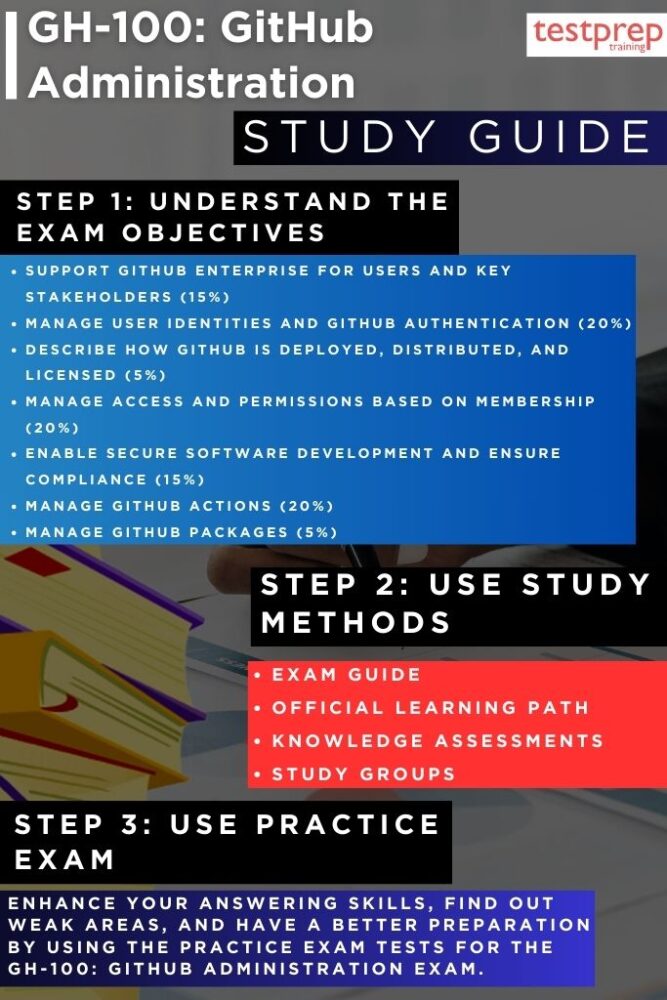
The first step in preparing for the GH-100: GitHub Administration exam is to study the official exam objectives published by Microsoft. These objectives clearly define the knowledge domains, technical tasks, and administrative capabilities that will be assessed. Topics typically include repository governance, workflow management, enterprise-level configuration, permissions and access control, and compliance with security standards. Reviewing these objectives will help you identify your existing strengths and the areas that require additional study, enabling you to build a focused and efficient preparation plan. By aligning your study sessions with the official objectives, you ensure that your learning is directly targeted to what the exam measures.
Step 2 – Follow the Official Microsoft Learn Path
A structured learning plan is essential for mastering the skills required for GH-100. Microsoft offers curated learning paths on Microsoft Learn, specifically designed to prepare candidates for GitHub administration roles. The training modules are:
– GitHub fundamentals – Administration basics and product features
This course introduces you to the essential concepts of GitHub, providing a strong foundation in its core features through guided, hands-on exercises within a live GitHub repository. You will explore best practices for building, hosting, and maintaining secure repositories, ensuring you can manage projects effectively while safeguarding your code and workflows.
By working directly within GitHub, you will gain practical experience in setting up repositories, applying version control principles, and leveraging collaboration tools to streamline development efforts. The modules are:
- GitHub Fundamentals – Administration Basics and Product Features (Part 1 of 2)
- GitHub Fundamentals – Administration Basics and Product Features (Part 2 of 2)
– Manage GitHub Actions in the Enterprise
Within this learning path, the Manage GitHub Actions in the Enterprise module addresses several critical competencies:
- Identifying management tools at the enterprise and organization level – Gain familiarity with the administrative interfaces, policy settings, and usage controls needed to oversee workflows and Actions across multiple teams.
- Evaluating and selecting runners – Understand the differences between GitHub-hosted and self-hosted runners, and learn to choose the right option based on scalability, performance, and compliance requirements.
- Configuring self-hosted runners – Learn how to install, register, and customize self-hosted runners, tailoring their capabilities to meet enterprise-specific workload demands.
- Managing encrypted secrets – Develop the ability to create, store, and integrate encrypted secrets into workflows, ensuring the secure handling of sensitive credentials and configuration data.
By completing this learning path and its modules, you not only gain theoretical knowledge but also hands-on experience with tools and configurations that are directly applicable to the GH-100 exam.
Step 3 – Take Knowledge Assessments After Each Module
After finishing each module in the learning path, it is essential to attempt the associated knowledge assessments. These short quizzes are designed to verify your understanding of key concepts before progressing to more advanced topics. Treat incorrect answers as opportunities for deeper learning—review the explanations provided, revisit the relevant content, and clarify any points of confusion. This approach ensures that your knowledge is reinforced at every stage and that you maintain steady progress toward exam readiness.
Step 4 – Engage with Study Groups and Peer Discussions
Independent study is important, but collaborative learning can greatly enhance your preparation. Joining GitHub-focused study groups, Microsoft Learn community forums, or professional networks such as LinkedIn allows you to exchange knowledge with peers who are also preparing for the GH-100 exam. These discussions often expose you to real-world administrative challenges, troubleshooting strategies, and best practices that extend beyond the official curriculum. Additionally, interacting with others can help you identify alternative approaches to solving complex GitHub administration problems.
Step 5 – Attempt GH-100 Practice Tests
Before scheduling the official exam, invest time in completing GH-100 practice tests. These simulated assessments closely replicate the question formats, complexity levels, and time constraints of the actual proctored exam. Beyond testing your recall of facts, practice exams help you refine your time management skills for the 100-minute limit, become comfortable with scenario-based and interactive tasks, and identify any lingering weaknesses in your knowledge. Always review the explanations for both correct and incorrect answers to strengthen your conceptual understanding.
Step 6 – Conduct a Final Review and Readiness Check
In the final phase of your preparation, consolidate your learning by revisiting high-priority topics and re-engaging with the most challenging areas identified during practice testing. Repeat key exercises, re-take selected knowledge assessments, and ensure you can apply concepts to practical, real-world GitHub administration scenarios. The GH-100 exam does not simply measure memorization—it assesses your ability to apply your skills in realistic situations. Approaching the exam with this mindset will increase both your confidence and your likelihood of success.
