
GH-300: GitHub Copilot

The GH-300: GitHub Copilot certification is for professionals in the software development ecosystem who actively leverage GitHub and seek to enhance productivity through AI-assisted coding. It validates an individual’s ability to utilize GitHub Copilot effectively, demonstrating both a conceptual understanding of its features and practical skills in integrating it into real-world development workflows. Candidates are expected to know how to configure, customize, and apply GitHub Copilot to accelerate coding tasks, improve code quality, and streamline collaborative projects. Upon successful completion, the credential remains valid for two years, underscoring a verified level of proficiency with this evolving AI-powered development tool.
Target Audience
This certification is ideal for:
- Software Developers looking to integrate AI-driven assistance into their daily programming.
- Administrators responsible for managing GitHub environments and ensuring efficient workflow configurations.
- Project Managers overseeing development teams who wish to understand and optimize AI-assisted coding capabilities for project success.
Candidates should possess:
- A foundational knowledge of GitHub Copilot’s functionalities and integration methods.
- Hands-on experience using GitHub Copilot to enhance development efficiency, code consistency, and collaborative workflows.
Exam Details

- The GH-300: GitHub Copilot exam is an intermediate-level certification assessment designed for professionals such as App Makers, Developers, DevOps Engineers, and Technology Managers.
- Candidates are allotted 100 minutes to complete the proctored exam, which primarily focuses on features that are generally available (GA) but may also include questions on commonly used Preview features.
- In addition to standard questions, the assessment may contain interactive components that require hands-on responses.
- The exam is offered in multiple languages, including English, Spanish, Portuguese (Brazil), Korean, and Japanese, ensuring accessibility for a diverse global audience.
Course Outline
The exam covers the following topics:
Domain 1: Understand Responsible AI (7%)
Explaining responsible usage of AI
- Describing the risks associated with using AI
- Explaining the limitations of using generative AI tools (depth of the source data for the model, bias in the data, etc.)
- Explaining the need to validate the output of AI tools
- Identifying how to operate a responsible AI
- Identifying the potential harms of generative AI (bias, secure code, fairness, privacy, transparency)
- Explaining how to mitigate the occurrence of potential harms
- Explaining ethical AI
Domain 2: Understand GitHub Copilot plans and features (31%)
Identifying the different GitHub Copilot plans
- Understanding the differences between Copilot Individual, Copilot Business, Copilot Enterprise, and Copilot Business for non-GHE
- Understand Copilot for non-GitHub customers
- Defining GitHub Copilot in the IDE
- Defining GitHub Copilot Chat in the IDE
- Describing the different ways to trigger GitHub Copilot (chat, inline chat, suggestions, multiple suggestions, exception handling, CLI)
Identifying the main features with GitHub Copilot Individual
- Explaining the difference between GitHub Copilot Individual and GitHub Copilot Business (data exclusions, IP indemnity, billing, etc.)
- Understanding the available features in the IDE for GitHub Copilot Individual
Identifying the main features of GitHub Copilot Business
- Demonstrating how to exclude specific files from GitHub Copilot
- Demonstrate how to establish organization-wide policy management
- Describing the purpose of organization audit logs for GitHub Copilot Business
- Explaining how to search audit log events for GitHub Copilot Business
- Explaining how to manage GitHub Copilot Business subscriptions via the REST API
Identifying the main features with GitHub Copilot Chat
- Identifying the use cases where GitHub Copilot Chat is most effective
- Explain how to improve performance for GitHub Copilot Chat
- Identifying the limitations of using GitHub Copilot Chat
- Identify the available options for using code suggestions from GitHub Copilot Chat
- Explaining how to share feedback about GitHub Copilot Chat
- Identify the common best practices for using GitHub Copilot Chat
- Identifying the available slash commands when using GitHub Copilot Chat
Identifying the main features with GitHub Copilot Enterprise
- Explaining the benefits of using GitHub Copilot Chat on GitHub.com
- Explain GitHub Copilot pull request summaries
- Explaining how to configure and use Knowledge Bases within GitHub Copilot Enterprise
- Describe the different types of knowledge that can be stored in a Knowledge Base (e.g., code snippets, best practices, design patterns)
- Explaining the benefits of using Knowledge Bases for code completion and review (e.g., improve code quality, consistency, and efficiency)
- Describing instructions for creating, managing, and searching Knowledge Bases within GitHub Copilot Enterprise, including details on indexing and other relevant configuration steps
- Explaining the benefits of using custom models
Using GitHub Copilot in the CLI
- Discuss the steps for installing GitHub Copilot in the CLI
- Identifying the common commands when using GitHub Copilot in the CLI
- Identifying the multiple settings you can configure within GitHub Copilot in the CLI
Domain 3: Learn how GitHub Copilot works and handles data (15%)
Describing the data pipeline lifecycle of GitHub Copilot code suggestions in the IDE
- Visualizing the lifecycle of a GitHub Copilot code suggestion
- Explain how GitHub Copilot gathers context
- Explaining how GitHub Copilot builds a prompt
- Describe the proxy service and the filters each prompt goes through
- Describing how the large language model produces its response
- Explaining the post-processing of GitHub Copilot’s responses through the proxy server
- Identifying how GitHub Copilot identifies matching code
Describing how GitHub Copilot handles data
- Describe how the data in GitHub Copilot individual is used and shared
- Explaining the data flow for GitHub Copilot code completion
- Explaining the data flow for GitHub Copilot Chat
- Describe the different types of input processing for GitHub Copilot Chat (types of prompts it was designed for)
Describing the limitations of GitHub Copilot (and LLMs in general)
- Describe the effect of most seen examples on the source data
- Describing the age of code suggestions (how old and relevant the data is)
- Describe the nature of GitHub Copilot providing reasoning and context from a prompt vs calculations
- Describing limited context windows

Domain 4: Learn about Prompt Crafting and Prompt Engineering (9%)
Describing the fundamentals of prompt crafting
- Describing how the context for the prompt is determined
- Describe the language options for promoting GitHub Copilot
- Describing the different parts of a prompt
- Describe the role of prompting
- Describing the difference between zero-shot and few-shot prompting
- Describe the way chat history is used with GitHub Copilot
- Identifying prompt crafting best practices when using GitHub Copilot
Describing the fundamentals of prompt engineering
- Explaining prompt engineering principles, training methods, and best practices
- Describe the prompt process flow
Domain 5: Understand Developer use cases for AI (14%)
Improving developer productivity
- Describe how AI can improve common use cases for developer productivity
- Learning new programming languages and frameworks
- Language translation
- Context switching
- Writing documentation
- Personalized context-aware responses
- Generating sample data
- Modernizing legacy applications
- Debugging code
- Data science
- Code refactoring
- Discussing how GitHub Copilot can help with SDLC (Software Development Lifecycle) management
- Describe the limitations of using GitHub Copilot
- Describing how to use the productivity API to see how GitHub Copilot impacts coding
Domain 6: Learn Testing with GitHub Copilot (9%)
Describing the options for generating testing for your code
- Describe how GitHub Copilot can be used to add unit tests, integration tests, and other test types to your code
- Explaining how GitHub Copilot can assist in identifying edge cases and suggesting tests to address them
Describing the different SKUs for GitHub Copilot
- Describe the different SKUs and the privacy considerations for GitHub Copilot
- Describing the different code suggestion configuration options on the organization level
- Describe the GitHub Copilot Editor config file
Domain 7: Learn About Privacy Fundamentals and Context Exclusions (15%)
Enhancing code quality through testing
- Describe how to improve the effectiveness of existing tests with GitHub Copilot’s suggestions
- Describing how to generate boilerplate code for various test types using GitHub Copilot
- Explain how GitHub Copilot can help write assertions for different testing scenarios
Leveraging GitHub Copilot for security and performance
- Describe how GitHub Copilot can learn from existing tests to suggest improvements and identify potential issues in the code
- Explaining how to use GitHub Copilot Enterprise for collaborative code reviews, leveraging security best practices, and performance considerations
- Explaining how GitHub Copilot can identify potential security vulnerabilities in your code
- Describing how GitHub Copilot can suggest code optimizations for improved performance
Identifying content exclusions
- Describing how to configure content exclusions in a repository and organization
- Explain the effects of content exclusions
- Explaining the limitations of content exclusions
- Describing the ownership of GitHub Copilot outputs
- Describing the duplication detector filter
- Explain contractual protection
- Explaining how to configure GitHub Copilot settings on GitHub.com
- Enabling/disabling duplication detection
- Enabling/disabling prompt and suggestion collection
- Describing security checks and warnings
- Explaining how to solve the issue if code suggestions are not showing in your editor for some files
- Explain why context exclusions may not be applied
- Explaining how to trigger GitHub Copilot when suggestions are either absent or not ideal
- Explaining steps for context exclusions in code editors
GH-300: GitHub Copilot Exam FAQs
Exam Policies
Microsoft offers various exam policies. Some of them are:
- Proctoring and Assessment Format
- The GH-300: GitHub Copilot Exam is a fully proctored certification assessment designed to ensure a secure, consistent, and fair evaluation process. The exam may include interactive elements that simulate real-world development scenarios, enabling candidates to demonstrate their proficiency in configuring, customizing, and applying GitHub Copilot to enhance productivity, improve code quality, and streamline workflows. These components are intended to assess both conceptual understanding and practical application of GitHub Copilot’s capabilities.
- Exam Duration and Candidate Experience
- Candidates have 100 minutes to complete the assessment. It is highly recommended to review the official Exam Duration and Exam Experience guidelines beforehand, as these provide valuable information on time management, question structure, and potential interactive or task-based exercises. Familiarizing yourself with these details will help ensure confidence and efficiency during the exam.
- Retake Policy
- Candidates who do not pass the exam on their first attempt may retake it after a 24-hour waiting period. Additional retakes will require longer intervals, depending on the number of previous attempts. This policy is intended to provide candidates with sufficient time to strengthen their knowledge, refine their skills, and prepare effectively before reattempting the certification.
GH-300: GitHub Copilot Exam Study Guide
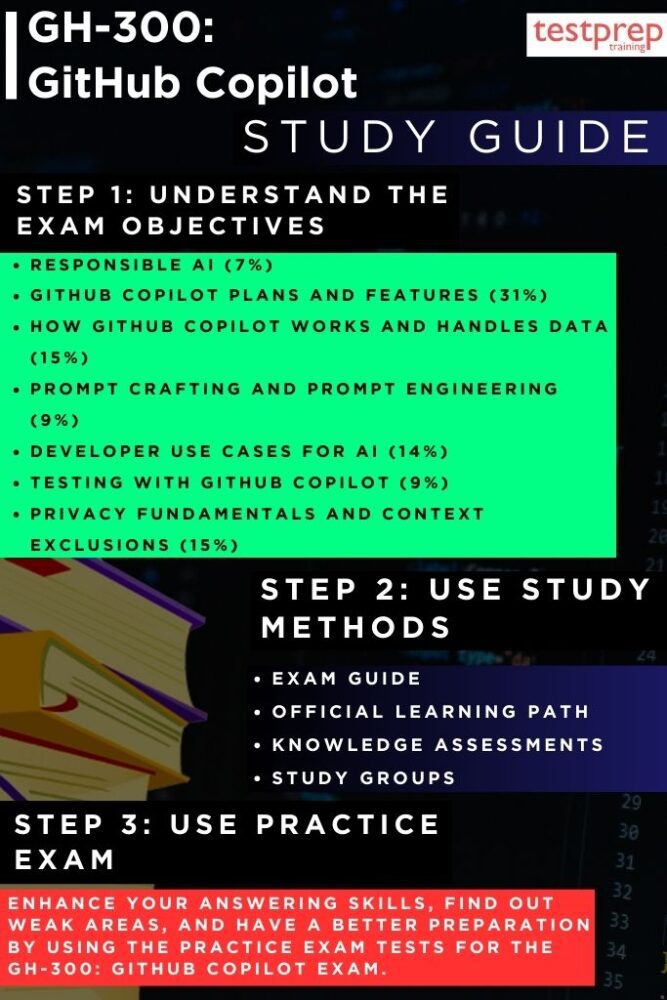
Step 1 – Understand the Exam Objectives
Start your preparation by visiting the official Microsoft GH-300: GitHub Copilot Exam page. Review each skill measured, paying close attention to the functional areas such as AI-assisted code generation, prompt optimization, feature configuration, integration within GitHub environments, and workflow automation. Break these objectives into smaller learning goals so you can address them systematically. Understanding what the exam covers will help you avoid spending time on irrelevant topics and instead focus on the competencies that are assessed.
Step 2 – Follow the Official Learning Path
Microsoft’s dedicated learning path for GitHub Copilot offers structured training modules that combine theory with practical, hands-on exercises. Progress through these modules in the recommended order to build your foundation before moving to advanced topics. Each section often includes real-world coding scenarios, guided demonstrations, and self-paced labs, ensuring that you gain both conceptual understanding and technical proficiency. Keep notes as you go through the content, as summarizing key points in your own words helps with long-term retention. This includes:
– Course GH-300T00-A: GitHub Copilot
This course delves into the practical and responsible use of GitHub Copilot, a generative AI tool designed to assist developers in writing code more efficiently. Participants will gain the knowledge and skills required to leverage Copilot’s capabilities effectively while addressing ethical, operational, and governance considerations associated with AI adoption.
It is intended for a diverse audience, including AI developers and engineers who build and deploy AI systems and must navigate ethical implications; data scientists and analysts focused on transparency, fairness, and accountability; business leaders and managers overseeing AI-driven initiatives who seek to implement responsible AI practices; and policymakers or regulators tasked with developing frameworks to ensure AI technologies are applied ethically, safely, and in compliance with industry standards.
Step 3 – Complete Knowledge Assessments
At the end of each training module, take advantage of the built-in knowledge checks and quizzes. These assessments act as checkpoints to verify your grasp of the material and highlight areas where additional study is required. Avoid rushing through them—review the explanations for both correct and incorrect answers to deepen your understanding. Treat these as opportunities to identify weaknesses early, so you can address them before moving to higher-level concepts.
Step 4 – Engage in Study Groups and Learning Communities
Active participation in study groups, online forums, and GitHub-focused communities can significantly enhance your preparation. Platforms like Microsoft Learn Community, LinkedIn groups, or GitHub Discussions often have candidates sharing tips, discussing tricky features, and posting helpful resources. Group interactions can expose you to alternative problem-solving approaches and practical insights you may not find in the official materials. Additionally, teaching or explaining a concept to others is one of the most effective ways to reinforce your own knowledge.
Step 5 – Take GH-300 Practice Tests and Simulations
Once you’ve built a solid knowledge base, begin taking practice tests to measure your readiness. Prioritize official Microsoft-provided or highly reputable third-party practice exams to ensure question quality and relevance. These simulations mirror the format, time constraints, and complexity of the actual test, helping you develop effective time management strategies. After each practice attempt, analyze your results in detail to identify recurring mistakes or weak areas. Revisit those topics in the learning path and retake the practice tests until you consistently achieve a high score.
Step 6 – Consolidate and Apply Your Knowledge
In the final stage of preparation, focus on consolidating everything you’ve learned. Review your notes, revisit challenging modules, and practice using GitHub Copilot in real coding environments. Simulate tasks such as generating functions, improving code snippets, and integrating Copilot suggestions into live projects. This practical reinforcement not only boosts confidence but also ensures that your skills are exam-ready and transferable to actual development work.
