
GH-500: GitHub Advanced Security

The GitHub Advanced Security (GH-500) Certification is designed to formally recognize your expertise in safeguarding code repositories, securing workflows, and implementing advanced security best practices within GitHub. This certification validates your ability to identify vulnerabilities, apply security controls, and enhance overall software integrity in alignment with industry standards. By earning the GH-500 credential, you demonstrate a comprehensive understanding of:
- Vulnerability Detection and Management – Leveraging GitHub’s security tools to proactively detect, assess, and remediate potential threats.
- Secure Workflow Design – Implementing and maintaining robust CI/CD pipelines that adhere to security best practices.
- Advanced Security Configurations – Applying policies, permissions, and protective measures to safeguard repositories and sensitive data.
The certification remains valid for two years from the date of achievement, ensuring that credential holders stay aligned with evolving GitHub security capabilities and industry trends.
Target Audience
This exam is intended for:
- System Administrators responsible for configuring and managing GitHub Enterprise environments with a focus on security compliance.
- Software Developers who integrate security practices into their development lifecycle and GitHub workflows.
- Application Administrators tasked with maintaining secure code repositories and deployment pipelines.
- IT Professionals with intermediate-level experience in GitHub Enterprise Administration, aiming to expand their role to include advanced security responsibilities.
Candidates are expected to have prior hands-on experience with GitHub’s security features, including secret scanning, dependency review, and code scanning, as well as a strong grasp of secure software development practices.
Exam Details

- The GH-500: GitHub Advanced Security Exam is an intermediate-level certification designed for Administrators, Developers, DevOps Engineers, Solution Architects, and Students seeking to validate their expertise in advanced GitHub security practices.
- Candidates are allotted 100 minutes to complete the assessment, which will be proctored and may include interactive components that simulate real-world scenarios.
- The exam is available in English, Spanish, Portuguese (Brazil), Korean, and Japanese, ensuring accessibility for a global audience.
- While the majority of questions focus on features that are in General Availability (GA), some may address Preview features if they are widely adopted in practical use.
Course Outline
The exam covers the following topics:
Domain 1: Describing the GHAS security features and functionality (15%)
Contrasting GHAS features and their role in the security ecosystem
- Differentiating the security features that come automatically for open source projects, and what features are available when GHAS is paired with GHEC or GHES
- Describing the features and benefits of Security Overview
- Describe the differences between secret scanning and code scanning
- Describing how secret scanning, code scanning, and Dependabot create a more secure software development life cycle
- Contrasting a security scenario with isolated security review and an advanced scenario, with security integrated into each step of the software development life cycle
Explaining and using specific GHAS features
- Describing how vulnerable dependencies are identified (by looking at the manifest files and comparing with databases of known vulnerabilities)
- Choose how to act on alerts from GHAS
- Explaining the implications of ignoring an alert
- Explain the role of a developer when they discover a security alert
- Describing the differences in access management to view alerts for different security features
- Identifying where to use Dependabot alerts in the software development lifecycle
Domain 2: Configuring and using secret scanning (15%)
Configuring and using Secret Scanning
- Describing secret scanning
- Describe push protection
- Describing validity checks
- Contrast secret scanning availability for public and private repositories
- Enabling secret scanning for private repositories
- Pick an appropriate response to a secret scanning alert
- Determining if an alert is generated for a given secret, pattern, or service provider
- Determining if a given user role will see secret scanning alerts and how they will be notified
Customizing default secret scanning behavior
- Configuring the recipients of a secret scanning alert (also includes how to provide access to members and teams other than admins)
- Exclude certain files from being scanned for secrets
- Enabling custom secret scanning for a repository
Domain 3: Configuring and using Dependabot and Dependency Review (35%)
Describing tools for managing vulnerabilities in dependencies
- Defining the dependency graph
- Describing how the dependency graph is generated
- Describing what a Software Bill of Materials (SBOM) is, and the SBOM format used by GitHub
- Defining a dependency vulnerability
- Describe Dependabot alerts
- Describing Dependabot security updates
- Describe Dependency Review
- Describing how alerts are generated for vulnerable dependencies (driven from the dependency graph, sourced from the GitHub Advisory Database)
- Describe the difference between Dependabot and Dependency Review
Enabling and configuring tools for managing vulnerable dependencies
- Identifying the default settings for Dependabot alerts in public and private repositories
- Identify the permissions and roles required to enable Dependabot alerts
- Identifying the permissions and roles required to view Dependabot alerts
- Enabling Dependabot alerts for private repositories
- Enabling Dependabot alerts for organizations
- Creating a valid Dependabot configuration file to group security updates
- Creating a Dependabot Rule to auto-dismiss low severity alerts until a patch is available
- Create a Dependency Review GitHub Actions workflow
- Configure license checks and custom severity thresholds in a Dependency Review workflow
- Configuring notifications for vulnerable dependencies

Identifying and remediating vulnerable dependencies
- Identifying a vulnerable dependency from a Dependabot alert
- Identify vulnerable dependencies from a pull request
- Enabling Dependabot security updates
- Remedy a vulnerability from a Dependabot alert in the Security tab (could include updating or removing the dependency)
- Remedy a vulnerability from a Dependabot alert in the context of a pull request (could include updating or removing the dependency)
- Take action on any Dependabot alerts by testing and merging pull requests
Domain 4: Configuring and using Code Scanning with CodeQL (25%)
Using code scanning with third-party tools
- Enabling code scanning for use with a third-party analysis
- Contrast the steps for using CodeQL versus third party analysis when enabling code scanning
- Contrasting how to implement CodeQL analysis in a GitHub Actions workflow versus a third-party CI tool
- Upload 3rd party SARIF results via the SARIF endpoint
Describing and enabling code scanning
- Describe how code scanning fits in the software development life cycle
- Contrasting the frequency of code scanning workflows (scheduled versus triggered by events)
- Choosing a triggering event for a given development pattern (for example, in a pull request and for specific files)
- Editing the default template for Actions workflow to fit an active, open source, production repository
- Describing how to view code scanning results from CodeQL analysis
- Troubleshooting a failing code scanning workflow using CodeQL, including creating or changing a custom configuration in the CodeQL workflow
- Follow the data flow through code using the show paths experience
- Explain the reason for a code scanning alert given documentation linked from the alert
- Determining if and why a code scanning alert needs to be dismissed
- Describe potential shortfalls in CodeQL via model of compilation and language support
- Explaining the purpose of defining a SARIF category
Domain 5: Describing GitHub Advanced Security best practices, results, and how to take corrective measures (10%)
GitHub Advanced Security results & best practices
- Using a Common Vulnerabilities and Exposures (CVE) and Common Weakness Enumeration (CWE) to describe a GitHub Advanced Security alert and list potential remediation
- Describe the decision-making process for closing and dismissing security alerts (documenting the dismissal, making a decision based on data)
- Describing the default CodeQL query suites
- Describe how CodeQL analyzes code and produces results, including differences between compiled and interpreted language
- Determining the roles and responsibilities of development and security teams on a software development workflow
- Describe how the severity threshold for code scanning pull request status checks can be changed
- Explaining how filters and sorting can be used to prioritize secret scanning remediation (validity:active)
- Explain how CodeQL & Dependency Review workflows can be enforced with Repository Rulesets
- Describing how code scanning can be configured to identify and remediate vulnerabilities earlier (scanning upon pull request)
- Describe how secret scanning can be configured to identify and remediate vulnerabilities earlier (enabling push protection)
- Describing how dependency analysis can be configured to identify and remediate vulnerabilities earlier (enable dependency review to scan upon pull request)
GH-500: GitHub Advanced Security Exam FAQs
Exam Policies
Microsoft offers various exam policies. Some of them are:
- Proctoring and Assessment Format
- The GH-500: GitHub Advanced Security Exam is a fully proctored certification assessment designed to ensure a secure, fair, and standardized evaluation process. The exam may include interactive components that replicate real-world GitHub security scenarios, allowing candidates to demonstrate their ability to identify vulnerabilities, implement protective measures, configure security workflows, and enforce compliance policies. These components are intended to assess both theoretical knowledge and hands-on expertise in GitHub Advanced Security features.
- Exam Duration and Experience
- Candidates are allotted 100 minutes to complete the assessment. It is strongly recommended to review the official Exam Duration and Exam Experience guidelines in advance. These resources provide insights into time allocation, question formats, and potential task-based or interactive exercises, enabling candidates to familiarize themselves with the structure, expectations, and flow of the exam.
- Retake Policy
- If a candidate does not pass the exam on their initial attempt, they may retake it after a 24-hour waiting period. Subsequent retakes will require a longer waiting period, determined by the number of previous attempts. This policy is designed to provide candidates with adequate time to revisit core concepts, strengthen skills, and improve performance before reattempting the exam.
GH-500: GitHub Advanced Security Exam Study Guide
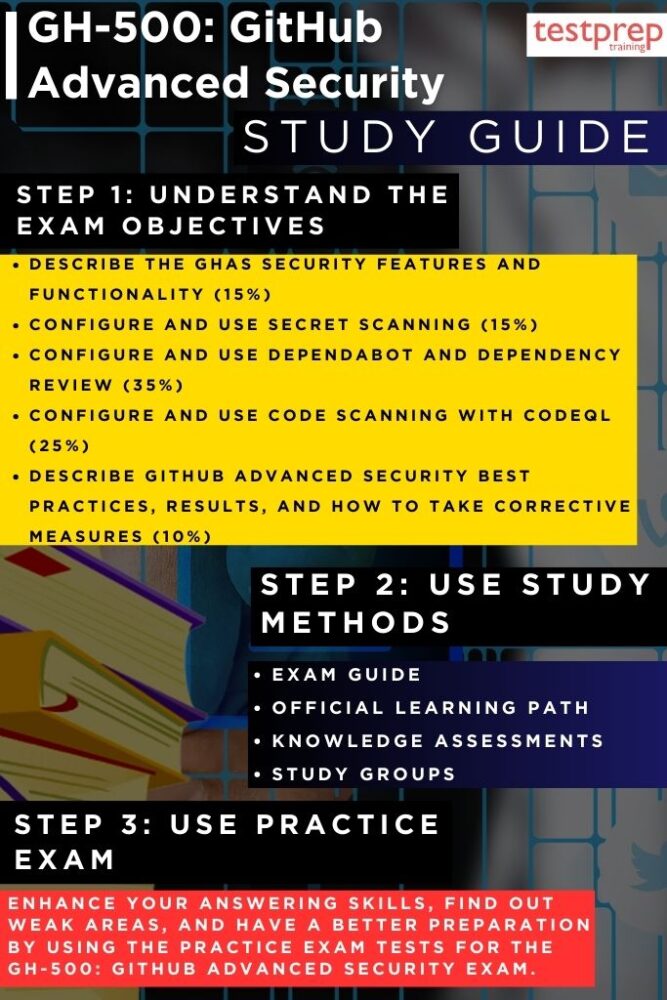
Step 1: Understand the Exam Objectives
Begin your preparation by thoroughly reviewing the official GH-500: GitHub Advanced Security Exam page on Microsoft Learn. This is your blueprint for success, as it outlines the key skill areas, percentage weightings, and the types of tasks you may encounter. Understanding the objectives upfront will help you set a clear study plan, ensuring that you dedicate more time to heavily weighted areas such as vulnerability detection, secure workflow design, and advanced GitHub security configurations.
In addition to reading the skills outline, consider exploring related documentation and GitHub security feature pages. This will help you develop a well-rounded view of the tools you’ll be tested on, including secret scanning, code scanning, dependency management, and workflow security. By fully understanding the expectations, you reduce the risk of being caught off guard during the assessment.
Step 2: Follow the Official Learning Path
Microsoft’s Learning Path offers a structured progression of knowledge that combines foundational concepts with advanced, hands-on skills. This path is designed to help candidates move from understanding basic security concepts to confidently applying GitHub Advanced Security (GHAS) in real-world scenarios. The learning path integrates self-paced modules with guided, instructor-led training, ensuring you build not only theoretical knowledge but also practical expertise in securing GitHub environments.
– Course GH-500T00-A: GitHub Advanced Security
The GH-500T00-A instructor-led course delivers a comprehensive exploration of GHAS, its capabilities, and its role in enhancing the security posture of software projects. You will gain deep experience in using GHAS features such as secret scanning for detecting and mitigating leaked credentials, code scanning for automating vulnerability detection within repositories, and Dependabot for proactively managing dependency updates. The course also discusses strategies for integrating GHAS into enterprise-level security frameworks, aligning with compliance standards, and ensuring security is embedded into every stage of the development lifecycle.
– Introduction to GitHub Advanced Security Module
This foundational module provides an essential understanding of GHAS features and the principles behind them. By the end of this module, you will be able to clearly define GHAS and its core capabilities, explain how these features integrate into the development process, and identify best practices for addressing common security gaps. The module also emphasizes how GHAS operates as part of a larger security ecosystem, ensuring you not only learn the “how” but also the “why” behind each feature. Completing this module before advancing to complex configurations ensures a strong base of knowledge to build upon.
Step 3: Test Your Knowledge with Knowledge Assessments
Once you have completed each part of the Learning Path, take advantage of the knowledge assessments provided at the end of the modules. These assessments serve as checkpoints, helping you verify how much you’ve retained and where your weaknesses may lie. They are not just quizzes — they simulate the kind of thinking and decision-making you will need in the exam. Reviewing your results carefully and revisiting weak areas will significantly improve your readiness for the GH-500 exam.
Step 4: Join Study Groups and Professional Communities
Engaging with other candidates and professionals in the GitHub security space can enhance your preparation. Join Microsoft Learn study groups, participate in GitHub community discussions, or connect with peers on LinkedIn groups dedicated to DevSecOps and GitHub security. By exchanging ideas, sharing real-world use cases, and discussing challenging concepts, you broaden your perspective and deepen your understanding beyond what is covered in the official course content.
Step 5: Practice with GH-500 Exam Practice Tests
Practical exam simulations are a vital part of preparation. Attempt multiple GH-500 practice tests to experience the time pressure, question formats, and interactive tasks you may face. Treat each practice test as a learning opportunity — don’t just note your score, but analyze every incorrect answer to understand the reasoning behind the correct one. Over time, these tests will improve both your speed and accuracy.
Step 6: Review, Refine, and Schedule Your Exam
In the final phase of preparation, revisit the official skills measured list to ensure all objectives have been addressed thoroughly. Dedicate time to hands-on practice in a GitHub Enterprise environment, focusing on applying security configurations, interpreting scan results, and managing vulnerabilities effectively. Once you are confident in your knowledge and practical skills, schedule your proctored exam and review Microsoft’s exam policies and technical requirements to ensure a smooth test-day experience.
