
Salesforce Certified Tableau Desktop Foundations

The Salesforce Certified Tableau Desktop Foundations exam is an entry-level certification designed to validate foundational knowledge and practical understanding of Tableau Desktop. It is intended for individuals who have begun working with Tableau and want to formally demonstrate their ability to use the tool for basic data analysis and visualization tasks.
This certification assesses a candidate’s understanding of core Tableau Desktop features, including working with data, creating standard visualizations, and interpreting insights. It confirms that the candidate can confidently navigate Tableau Desktop and apply fundamental concepts in real-world or learning environments.
Purpose of the Certification
The Salesforce Certified Tableau Desktop Foundations credential validates essential Tableau knowledge for professionals who need to work with Tableau Desktop as part of their role. This includes employees, partners, customers, and independent professionals who rely on Tableau to explore data and communicate insights effectively.
By earning this certification, candidates demonstrate that they possess a solid foundation in Tableau Desktop and are prepared to continue building more advanced analytics and visualization skills.
Prerequisites
There are no formal prerequisites for attempting this exam. However, candidates are strongly encouraged to have at least three months of hands-on experience using Tableau Desktop to ensure familiarity with the interface, tools, and basic workflows. Upon successfully passing the exam, candidates are awarded the official title of Salesforce Certified Tableau Desktop Foundations by Salesforce.
Target Audience
This certification is best suited for individuals who:
- Have foundational knowledge of Tableau Desktop
- Have practical exposure to Tableau through basic usage
- Have approximately three months of experience applying Tableau Desktop skills
- Are beginning their journey in data visualization and analytics
The exam is ideal for beginners seeking to establish a recognized credential that validates their understanding of Tableau Desktop fundamentals in a professional context.
Exam Details
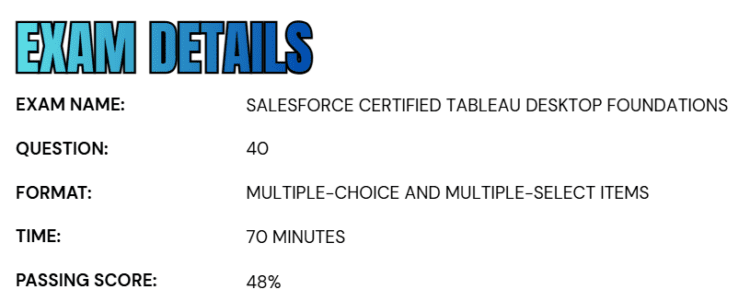
- The Salesforce Certified Tableau Desktop Foundations exam consists of 40 multiple-choice and multiple-select questions designed to assess a candidate’s understanding of core Tableau Desktop concepts and functionality.
- Candidates are provided 70 minutes to complete the exam.
- The passing score is set at 48% for the English version and 55% for the Japanese version, reflecting localized exam evaluation standards.
- The exam is delivered as a proctored assessment, which can be taken either onsite at an authorized Pearson VUE testing center or through a secure online proctored environment.
- This is a closed-book exam, and candidates are not permitted to use any hard-copy or online reference materials during the assessment.
Course Outline
The Salesforce Certified Tableau Desktop Foundations exam covers the following topics:
1. Understand Connecting to and Preparing Data: 23%
1.1 Creating live connections and extracts
- Creating a live connection to a data source
- Explaining the differences between using live connections versus extracts
- Creating an extract
- Saving metadata properties in a .TDS
- Creating a data source that uses multiple connections
1.2 Creating and managing the data model
- Adding relationships to a data source
- Adding joins and unions
- Explaining when to use a join versus a relationship
1.3 Managing data properties
- Rename a data field
- Assigning an alias to a data value
- Assigning a geographic role to a data field
- Changing data type for a data field (number, date, string, Boolean, etc.)
- Changing default properties for a data field (number format, aggregation, color, date format, etc.)
2. Exploring and Analyzing Data: 37%
2.1 Creating basic charts
- Creating a bar chart
- Creating a line chart
- Create a scatterplot
- Creating a map using geographic data
- Creating a combined axis chart
- Create a dual axis chart
- Create a stacked bar
- Create a density map
- Create a chart to show specific values (crosstab, highlight table)
2.2 Organizing data and apply filters
- Create groups by using marks, headers, and the data pane
- Creating sets by using marks and the data pane
- Organizing dimensions into a hierarchy
- Adding a filter to a view
- Adding a date filter
2.3 Applying analytics to a worksheet
- Adding a manual or a computed sort
- Adding a reference line
- Using a quick table calculation
- Using bins and histograms
- Creating a calculated field (e.g. string, date, simple arithmetic)
- Explaining when to use a parameter
- Displaying totals on a worksheet

3. Learn about Sharing Insights: 25%
3.1 Format view for presentation
- Using color from the marks card
- Configuring fonts
- Format marks as shapes
- Configure viz animations
- Changing size of marks
- Showing and hiding legends
3.2 Creating and modifying a dashboard
- Adding worksheets to a dashboard
- Adding interactive elements for consumers (e.g. show filters, data highlighter, tooltips)
- Adding dashboard actions (e.g. filter action, highlight action, parameter control, URL action)
- Configuring a dashboard layout and create device-specific dashboards
- Creating a story and a story point
3.3 Viewing and sharing workbook data
- Sharing a workbook (e.g. twbx as a PDF or an image, publish to Tableau Server)
- Viewing and exporting underlying data
- Exporting to Microsoft PowerPoint
4. Understanding Tableau Concepts: 15%
4.1 Understanding dimensions and measures
- Explaining what kind of information dimensions usually contain
- Explaining what kind of information measures usually contain
- Explaining the difference between dimensions and measures
4.2 Understanding discrete and continuous fields
- Explaining how discrete fields are displayed
- Explaining how continuous fields are displayed
- Explain the difference between discrete date parts and continuous date values
4.3 Understanding aggregations
- Explaining the default aggregation for measures
- Describing how an aggregated measure changes when dimensions are added to a view
Salesforce Certified Tableau Desktop Foundations Exam FAQs

Salesforce Certification Candidate Code of Conduct
At Salesforce, trust is a core value, and maintaining the integrity of its certification program is a shared responsibility. All candidates participating in the Salesforce Credentialing and Certification Program are required to agree to and comply with the Salesforce Credential and Certification Program Agreement. This ensures a fair, secure, and credible certification process for everyone.
Candidates are expected to prepare for their exams using Salesforce-approved learning resources, such as official exam guides, curated learning paths, and training offered through Trailhead and Trailhead Academy. Engaging with fellow learners in the Trailblazer Community—whether through study groups, mentors, or peers—is encouraged, as long as it aligns with program guidelines. Candidates must also carefully review and follow all rules related to online proctored and in-person exams, and report any suspicious or unethical activity that could compromise credential security.
The program strictly prohibits sharing, requesting, or using real exam questions, answers, or superbadge solutions. Candidates must not seek or provide assistance during an exam or engage in any activity that violates the program agreement. Any breach of these rules can result in serious consequences, including exam cancellation, suspension from future exams, revocation of certifications or superbadges, and permanent removal from the Salesforce Credentialing and Certification Program and the Trailblazer Community. Adhering to this code of conduct helps preserve the value and credibility of Salesforce certifications for all professionals.
Exam Reschedule and Cancellation Policy
For testing center (onsite) exams, candidates may reschedule or cancel their appointment up to 48 hours before the scheduled exam start time. Changes made more than 48 hours in advance can be completed free of charge through the Pearson VUE test taker account. Failure to attend the exam without prior notice will be treated as a no-show, and the full exam fee will be charged.
For online proctored exams, rescheduling or cancellation is allowed up to 24 hours before the exam start time and can be done at no cost through the Pearson VUE account. Missing the exam without contacting the Salesforce Help team in advance will also result in a no-show and forfeiture of the exam fee.
Note: The reschedule and cancellation policy for the Certified Technical Architect certification differs and is communicated separately to registered candidates.
Salesforce Certified Tableau Desktop Foundations Exam Study Guide
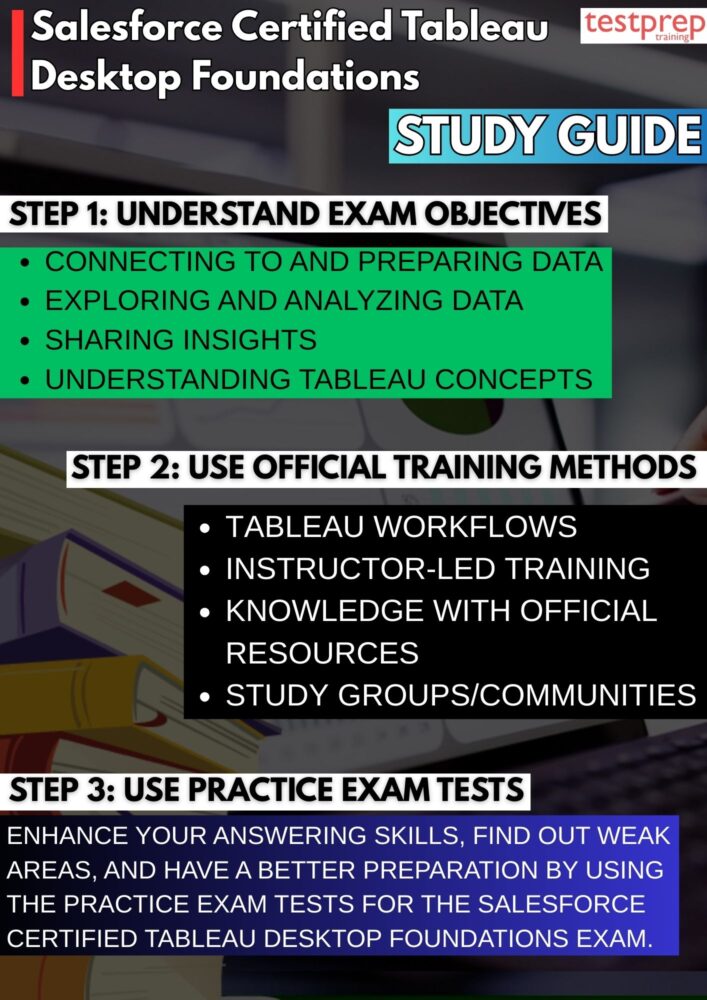
Step 1: Perform an In-Depth Review of Exam Objectives and Weighting
Begin your preparation by thoroughly analyzing the official exam outline to understand the specific skills and knowledge areas evaluated. The Salesforce Certified Tableau Desktop Foundations exam focuses on core competencies within Tableau Desktop, including data connections, data types, dimensions and measures, basic calculations, filters, sorting, chart selection, and introductory dashboard design. Understanding how these topics are framed and tested enables you to prioritize high-impact areas and align your preparation with exam expectations rather than general product familiarity.
Step 2: Build Practical Mastery Through End-to-End Tableau Workflows
Hands-on experience should reflect real analytical workflows. Practice connecting to different data sources, verifying data quality, assigning correct data roles, and creating multiple visualization types such as bar charts, line charts, maps, and tables. Apply filters, parameters, and simple calculations, and organize views into coherent dashboards. This structured practice helps develop intuition around Tableau’s behavior and reinforces the practical decision-making required to answer exam questions accurately.
Step 3: Consolidate Core Concepts Using Instructor-Led Training
Instructor-led courses, particularly Desktop I: Fundamentals, offer a comprehensive and standardized introduction to Tableau Desktop. These sessions emphasize correct terminology, best practices, and efficient workflows while providing context for how Tableau is used in professional environments. Instructor guidance helps clarify complex concepts early, reducing confusion and strengthening your foundational understanding.
Step 4: Expand Technical and Conceptual Knowledge with Official Resources
Use official Tableau learning resources to deepen both feature-level and conceptual knowledge. Free how-to training videos demonstrate practical feature usage, while Tableau Product Help and Product Support documentation explain functionality, options, and limitations in detail. The Visual Analysis Best Practices Guidebook is essential for understanding why certain visualization techniques are preferred, supporting informed decision-making in exam scenarios.
Step 5: Develop Strong Visualization and Analytical Judgment
The exam evaluates your ability to choose appropriate visualizations and communicate insights clearly. Focus on mastering visualization principles such as aligning chart types with data structures, using color and layout effectively, avoiding unnecessary complexity, and designing dashboards that emphasize clarity and usability. Developing analytical judgment ensures you can identify the most effective solution, not just a technically valid one.
Step 6: Enhance Understanding Through Peer Learning and Communities
Participating in study groups and professional communities allows you to learn from shared experiences and real-world examples. Engaging with Tableau-focused communities or Salesforce Trailblazer groups exposes you to common challenges, best practices, and exam preparation insights. Collaborative learning often reinforces understanding and highlights practical considerations that individual study may overlook.
Step 7: Assess Exam Readiness Through Targeted Practice and Review
Practice tests should be approached strategically. Use them to evaluate your understanding of Tableau concepts, identify knowledge gaps, and improve time management. After each practice session, review explanations carefully and relate them back to Tableau features and visualization principles. This reflective approach helps reinforce learning and ensures you are well-prepared for the exam environment.
