
Exam SC-500: Cloud and AI Security Engineer Associate
The Microsoft Certified: Cloud and AI Security Engineer Associate certification is intended for security professionals responsible for protecting organizational systems, data, and workloads across cloud and hybrid environments. Candidates for this certification implement comprehensive security controls that help prevent unauthorized access, reduce security risks, and strengthen an organization’s overall security posture.
Cloud and AI Security Engineers work across multiple security domains, including identity management, networking, applications, data protection, compute resources, and artificial intelligence workloads. They are responsible for ensuring that platforms, infrastructure, identities, and data supporting AI solutions are securely deployed, managed, and monitored.
Key Responsibilities
As a Cloud and AI Security Engineer, you are expected to:
- Secure access to organizational resources using Microsoft Entra ID and Azure Key Vault.
- Implement and maintain security, governance, and regulatory compliance controls.
- Protect storage accounts, databases, and sensitive organizational data.
- Secure networking environments and communication channels.
- Implement security controls for compute resources and workloads.
- Protect AI services, platforms, models, and related infrastructure.
- Monitor, assess, and improve the organization’s security posture.
Collaboration Across Teams
Professionals in this role frequently collaborate with a variety of technical teams and stakeholders, including:
- Cloud and Solution Architects
- Azure Administrators
- Security Engineers and Analysts
- Microsoft 365 Administrators
- Identity and Access Management Teams
- DevOps Engineers
- Application Developers
- Database Administrators
- Network Engineers
- Information Protection and Compliance Specialists
Recommended Skills and Experience
Before taking Exam SC-500, candidates should have hands-on experience administering Azure and hybrid environments. This experience should include managing and securing:
- Compute resources
- Network infrastructure
- Storage solutions
- Cloud and hybrid workloads
Candidates should also possess:
- Strong knowledge of Microsoft Entra ID and identity security concepts.
- Familiarity with Microsoft 365 administration and security capabilities.
- Experience implementing security controls across cloud environments.
- Understanding of governance, compliance, and risk management principles.
- Knowledge of security practices related to AI workloads and services.
Who Should Take This Exam?
Exam SC-500 is suitable for professionals who design, implement, and manage security controls for cloud, hybrid, and AI environments. It is particularly valuable for security engineers seeking to validate their expertise in securing Microsoft technologies while supporting modern AI-driven solutions.
Exam Details
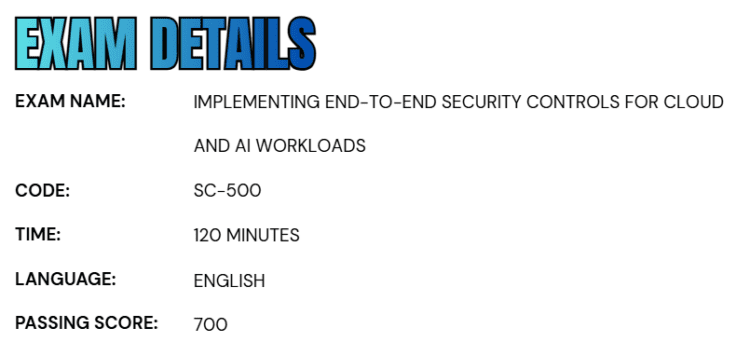
- The Microsoft Certified: Cloud and AI Security Engineer Associate certification is an intermediate-level credential designed for security engineers responsible for implementing security controls across cloud, hybrid, and AI environments.
- Exam SC-500 validates a candidate’s ability to secure identities, data, applications, networks, compute resources, and AI workloads while helping organizations maintain a strong security posture and meet compliance requirements.
- To earn this certification, candidates must achieve a passing score of 700 on the exam.
- The assessment duration is 120 minutes and is delivered in a proctored format to ensure exam integrity. Depending on the exam objectives, candidates may encounter interactive tasks and scenario-based components that evaluate practical skills in addition to technical knowledge.
- Currently, Exam SC-500 is available in English.
- Microsoft also provides exam accommodations for candidates who use assistive technologies, require additional testing time, or need modifications to the standard exam experience.
- Eligible candidates can request accommodations through the certification program’s accommodation process before scheduling their exam.
Course Outline
The Microsoft SC-500: Implementing End-to-End Security Controls for Cloud and AI Workloads Exam covers the following topics:
1. Learn about managing identity, access, and governance (20–25%)
Securing access to resources by using Microsoft Entra ID
- Implementing and configuring Privileged Identity Management (PIM) (Microsoft Documentation: Implement and configure Privileged Identity Management (PIM), Start using Privileged Identity Management)
- Implementing conditional access policies (Microsoft Documentation: Build a Conditional Access policy)
- Implementing and configuring authentication methods, including multifactor authentication (MFA) and passwordless (Microsoft Documentation: Microsoft Entra authentication overview, Manage user authentication methods, Configure Microsoft Entra multifactor authentication settings, Manage authentication methods for Microsoft Entra ID)
- Implementing and configuring identity for applications, including enterprise applications and app registrations (Microsoft Documentation: What is application management in Microsoft Entra ID?, Register an application in Microsoft Entra ID)
- Managing OAuth permission grants and consent settings (Microsoft Documentation: Configure how users consent to applications, Application consent management and evaluation of consent requests, Scopes and permissions in the Microsoft identity platform)
- Implementing and configuring managed identities for Azure resources (Microsoft Documentation: What is managed identities for Azure resources?, Configure managed identities on Azure virtual machines (VMs))
Securing secrets and keys by using Azure Key Vault
- Deploying Key Vault (Microsoft Documentation: About Azure Key Vault)
- Configuring Key Vault settings
- Configuring access to Key Vault (Microsoft Documentation: Provide access to Key Vault keys, certificates, and secrets)
- Configuring firewall settings on Key Vault (Microsoft Documentation: Configure network security for Azure Key Vault, Access Azure Key Vault behind a firewall)
- Managing keys, secrets, and certificates (Microsoft Documentation: Azure Key Vault keys, secrets, and certificates overview)
- Scanning for secrets by using Defender Cloud Security Posture Management (Defender CSPM) (Microsoft Documentation: Protecting secrets in Defender for Cloud, What is Cloud Security Posture Management (CSPM))
- Implementing Defender for Key Vault (Microsoft Documentation: Overview of Microsoft Defender for Key Vault, Protect your key vaults with Defender for Key Vault)
Implementing governance to enforce security and regulatory compliance
- Implementing and configuring security controls by using Azure Policy, including built-in and custom policy definitions (Microsoft Documentation: Azure Policy built-in initiative definitions, Azure Policy built-in policy definitions)
- Evaluating regulatory compliance by using Microsoft Defender for Cloud (Microsoft Documentation: Evaluate regulatory compliance in Defender for Cloud, Regulatory compliance standards in Microsoft Defender for Cloud, Improve regulatory compliance)
- Implementing and configuring security controls in Defender for Cloud, including security standards and recommendations (Microsoft Documentation: Configure security controls and remediate, Security policies in Defender for Cloud, Security recommendations)
- Implementing resource locks (Microsoft Documentation: Lock your Azure resources to protect your infrastructure)
- Managing Azure built-in role assignments (Microsoft Documentation: Azure built-in roles)
- Managing custom roles, including Azure roles and Microsoft Entra roles (Microsoft Documentation: Azure roles, Microsoft Entra roles, and classic subscription administrator roles, Azure custom roles)
- Evaluating and remediating overprivileged access assignments by using Azure role-based access control (RBAC) (Microsoft Documentation: Manage and right-size RBAC role assignments for least privilege, What is Azure role-based access control (Azure RBAC)?)
- Configuring security controls for backup protection by using Azure Backup security features (Microsoft Documentation: Overview of security features in Azure Backup, Security features to help protect hybrid backups that use Azure Backup, Protect backup data with Azure Backup security, Azure Policy Regulatory Compliance controls for Azure Backup)
- Implementing and configuring security controls by using infrastructure as code (Microsoft Documentation: Implement security controls in infrastructure as code)
2. Securing storage, databases, and networking (25–30%)
Implementing security for storage accounts
- Implementing and configuring security for storage accounts(Microsoft Documentation: Implement security and manage access for Azure Storage)
- Configuring Azure Storage firewall rules (Microsoft Documentation: Azure Storage firewall rules, Deploy and configure Azure Firewall using the Azure portal)
- Implementing Defender for Storage threat protection configurations (Microsoft Documentation: Implement Microsoft Defender for Storage, Enable and configure Defender for Storage)
- Managing access to storage, including access policies (Microsoft Documentation: Define a stored access policy, Azure permissions for Storage)
Implementing security for databases
- Implementing platform-level security configurations in Azure SQL (Microsoft Documentation: Implement security for Azure SQL databases)
- Configuring database auditing for Azure SQL Database and Azure SQL Managed Instance (Microsoft Documentation: Azure SQL Managed Instance auditing, Auditing for Azure SQL Database and Azure Synapse Analytics)
- Configuring Defender for Databases protection across Azure database services (Microsoft Documentation: Protect your databases with Defender for Databases, Microsoft Defender for Azure SQL Databases, Microsoft Defender for SQL)
Implementing security for Azure network services
- Implementing and managing network security groups (NSGs) and application security groups (ASGs) (Microsoft Documentation: Azure network security groups overview, Application security groups, Create, change, or delete a network security group)
- Implementing and configuring network access policies by using Azure Virtual Network Manager (Microsoft Documentation: What is Azure Virtual Network Manager?)
- Configuring security for an Azure Virtual WAN (Microsoft Documentation: Secure your Azure Virtual WAN deployment, What is Azure Virtual WAN?)
- Implementing and configuring security for virtual private network (VPN) connections (Microsoft Documentation: What is Azure VPN Gateway?)
- Implementing and configuring Microsoft Entra Private Access (Microsoft Documentation: Configure Microsoft Entra Private Access, Private Access for Active Directory domain controllers)
- Configuring Azure private endpoints to secure access to Azure platform as a service (PaaS) resources (Microsoft Documentation: Manage Azure private endpoints, Create a private endpoint by using the Azure portal, Azure Private endpoints for Paas resources)
- Configuring Azure Private Link services to secure access to network resources (Microsoft Documentation: Create a Private Link service by using the Azure portal, What is Azure Private Link service?)
- Implementing and configuring Azure Firewall (Microsoft Documentation: Deploy and configure Azure Firewall using the Azure portal, What is Azure Firewall?)
- Evaluating effective security rules by using Azure Network Watcher diagnostics (Microsoft Documentation: Effective security rules overview, Diagnose network security rules)
3. Understand about securing compute (20–25%)
- Identifying overexposure of data in SharePoint (Microsoft Documentation: Data overexposure policies in privacy risk management, How SharePoint and OneDrive safeguard your data in the cloud)
- Identifying risks related to Microsoft Copilot and AI apps by using Microsoft Purview Data Security Posture Management (DSPM) (Microsoft Documentation: Learn about Data Security Posture Management for AI, Identify AI data risks)
- Enabling and configuring real-time protection for Microsoft Copilot Studio agents (Microsoft Documentation: Enable real-time protection for Copilot Studio agents, Protect your environment in real-time during agent runtime)
- Implementing conditional access for Microsoft Entra Agent ID (Microsoft Documentation: Conditional Access for agents, What is Conditional Access?)
- Analyzing blast radius for security risks related to Entra Agent ID by using Defender XDR (Microsoft Documentation: Analyze AI identity risks using Microsoft Defender XDR, Investigate an identity)
- Managing Entra Agent ID access (Microsoft Documentation: Microsoft Entra Agent ID, Manage agent identities in your organization, What is Microsoft Entra?)
- Configuring and deploying AI Gateway in Azure API Management for Microsoft Foundry (Microsoft Documentation: Configure AI Gateway in your Foundry resources, AI gateway in Azure API Management)
- Enabling Defender for AI Service in Cloud Workload Protection in Defender for Cloud (Microsoft Documentation: Enable Defender for AI Services workload protection, Enable threat protection for AI services, What is Microsoft Defender for Cloud?)
- Configuring guardrails for agent security in Foundry (Microsoft Documentation: How to configure guardrails and controls in Microsoft Foundry, Guardrails and controls overview in Microsoft Foundry)
- Monitoring AI security by using the Data and AI security dashboard in Defender for Cloud (Microsoft Documentation: Assess your organization’s AI risk with Microsoft Security Dashboard for AI, Enable Defender for AI Services workload protection)
- Managing agents in Microsoft 365 admin center (Microsoft Documentation: Agent management in Microsoft 365 admin center, Manage agents in the Microsoft 365 admin center)

Implementing security for servers and virtual machines (VMs)
- Implementing and configuring disk encryption (Microsoft Documentation: Implement disk encryption for Azure virtual machines, Azure Disk Encryption for Windows VMs)
- Planning and implementing Azure Bastion (Microsoft Documentation: Plan and implement Azure Bastion, What is Azure Bastion?)
- Enabling and enforcing use of just-in-time (JIT) VM access (Microsoft Documentation: Enable just-in-time access, Just-in-time machine access)
- Extending security controls to hybrid and multicloud servers by using Azure Arc (Microsoft Documentation: Implement hybrid and multicloud adoption, Secure your hybrid and multicloud machines)
- Onboarding servers to Defender for Servers in Defender for Cloud, including hybrid and multicloud scenarios (Microsoft Documentation: Onboard servers through Microsoft Defender, Defender for Servers, Plan Defender for Servers deployment)
- Configuring Defender for Servers settings, including vulnerability scanning, and endpoint detection and response (EDR)
- Implementing and managing agentless scanning for VMs in Defender for Servers (Microsoft Documentation: Enable agentless machine scanning, Agentless machine scanning)
- Configuring security features on a VM, including secure boot, virtual Trusted Platform Module (vTPM), integrity monitoring, and security type (Microsoft Documentation: Boot integrity monitoring overview, Trusted Launch for Azure virtual machines)
- Enforcing security configuration of Azure-managed servers by using Azure Machine Configuration (Microsoft Documentation: Enforce VM security configuration with Azure Machine Configuration, What is Azure Machine Configuration?)
Implement security for application platform services
- Detecting misconfigurations and runtime risks in container workloads by using Defender for Containers (Microsoft Documentation: Detect container risks, Introduction to Microsoft Defender for Containers)
- Implementing and configuring security controls for Azure Kubernetes Service (AKS) (Microsoft Documentation: Implement security controls for Azure Kubernetes Service, Security concepts for applications and clusters)
- Implementing and configuring security controls for Azure Container Registry (Microsoft Documentation: Implement security controls, Azure security baseline for Container Registry)
- Implementing and configuring security controls for Azure Container Instances and Azure Container Apps (Microsoft Documentation: Security considerations for Azure Container Instances)
- Implementing and configuring security controls for Azure Functions, including authentication and network access (Microsoft Documentation: Implement security controls, Securing Azure Functions, Build an authentication service using Azure Functions)
- Implementing and configuring security controls for Azure Logic Apps (Microsoft Documentation: Secure access and data for workflows in Azure Logic Apps)
- Implementing and configuring security controls for Azure App Service (Microsoft Documentation: Implement security controls for Azure App Services and Web Application Firewall, Secure your Azure App Service deployment)
- Implementing and configuring Azure Web Application Firewall (Microsoft Documentation: What is Azure Web Application Firewall?)
- Implementing security policies for back-end API protection by using API Management (Microsoft Documentation: Implement API backend security using Azure API Management, Protect an API in Azure API Management, Policies in Azure API Management)
4. Managing and monitoring security posture (20–25%)
Managing security posture by using Defender for Cloud
- Identifying security risks by using Defender CSPM (Microsoft Documentation: What is Cloud Security Posture Management (CSPM), Explore risks to sensitive data)
- Evaluating compliance against security frameworks by using Defender for Cloud (Microsoft Documentation: Regulatory compliance standards in Microsoft Defender for Cloud, Review security recommendations)
- Enabling and configuring Defender for Cloud workload protection plans (Microsoft Documentation: Enable and configure workload protection plans, What is Microsoft Defender for Cloud?)
- Connecting hybrid cloud and multicloud environments to Defender for Cloud, including Amazon Web Services (AWS) and Google Cloud Platform (GCP)
- Configuring Microsoft Defender Vulnerability Management settings for Azure VMs (Microsoft Documentation: Configure Microsoft Defender Vulnerability Management settings)
- Discovering unprotected assets and vulnerabilities by using Microsoft Defender External Attack Surface Management (EASM) (Microsoft Documentation: Discover unprotected assets and vulnerabilities)
Implementing activity and event collection in Microsoft Sentinel
- Creating and connecting workspaces in Microsoft Sentinel (Microsoft Documentation: Set up multiple workspaces and tenants in Microsoft Sentinel, manage Microsoft Sentinel workspaces, Centrally manage multiple Microsoft Sentinel workspaces)
- Assigning roles in Microsoft Sentinel (Microsoft Documentation: Roles and permissions in the Microsoft Sentinel platform)
- Implementing and using content hub solutions (Microsoft Documentation: Discover and manage Microsoft Sentinel out-of-the-box content, Microsoft Sentinel out-of-the-box content overview, Microsoft Sentinel content hub catalog)
- Configuring and using Microsoft data connectors for Azure resources (Microsoft Documentation: Connect data sources to Microsoft Sentinel by using data connectors)
- Implementing and configuring syslog and Common Event Format (CEF) event collections (Microsoft Documentation: Ingest syslog and CEF messages, Syslog and Common Event Format (CEF))
- Implementing and configuring the collection of Windows Security events by using data collection rules, including Windows Event Forwarding (WEF) (Microsoft Documentation: Use Windows Event Forwarding to help with intrusion detection, Configure Windows event forwarding)
- Creating custom log tables in the workspace to store ingested data (Microsoft Documentation: Add or delete tables and columns in Azure Monitor Logs, Send data to Azure Monitor Logs)
- Implementing automation rules and playbooks in Microsoft Sentinel (Microsoft Documentation: Implement automation rules and playbooks in Microsoft Sentinel, Automate and run Microsoft Sentinel playbooks)
- Implementing data retention in Microsoft Sentinel data stores (Microsoft Documentation: Configure interactive and long-term data retention in Microsoft Sentinel, Manage data tiers and retention in Microsoft Sentinel)
- Querying Microsoft Purview Audit in Defender XDR (Microsoft Documentation: Auditing, Search the audit log for events in Microsoft Defender XDR)
Implementing Microsoft Security Copilot
- Configuring workspaces for Security Copilot (Microsoft Documentation: Configure workspaces for Microsoft Security Copilot)
- Managing permissions and roles in Security Copilot (Microsoft Documentation: Setup and Manage Security Copilot agents, Security and access control with Microsoft Security Copilot)
- Enabling and configuring plugins
- Enabling and configuring Microsoft agents and Security Store agents
Exam SC-500: Cloud and AI Security Engineer Associate FAQs
Certification Exam Policies
Microsoft certification exams are governed by established policies designed to maintain fairness, security, and consistency throughout the testing process. Candidates should review the official exam rules, identification requirements, testing procedures, and candidate obligations before scheduling an exam. Understanding these guidelines in advance can help prevent registration issues, testing disruptions, or appointment cancellations.
– Exam Retake Policy
Candidates who do not pass an exam may attempt it again according to Microsoft’s retake guidelines. A waiting period of 24 hours typically applies before scheduling a second attempt. Beginning with the third attempt, candidates are generally required to wait 14 days between exam registrations.
Microsoft also restricts candidates to a maximum of five attempts for the same exam within a 12-month period. Once an exam has been passed, retaking it is usually not allowed unless a specific renewal or recertification process is offered. Every exam attempt requires a separate registration and applicable exam fee unless covered by an approved voucher or promotional offer.
Microsoft SC-500: Implementing End-to-End Security Controls for Cloud and AI Workloads Exam Study Guide
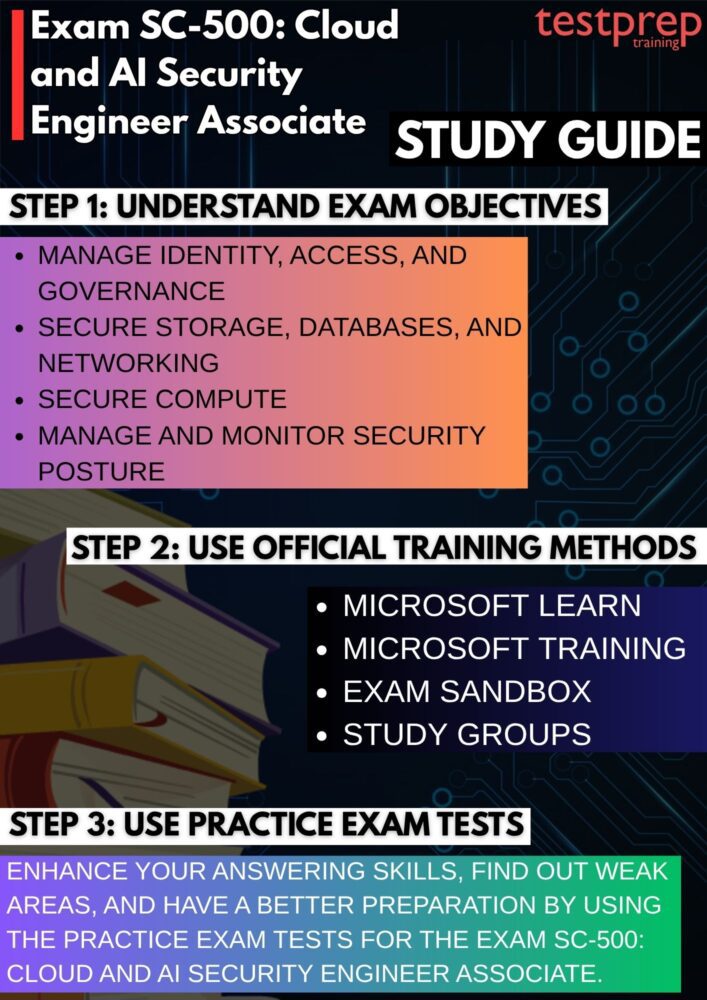
Step 1: Review the Official Exam Skills Outline
Begin your preparation by carefully studying the official SC-500 exam objectives. The skills outline serves as the roadmap for your entire preparation journey, helping you understand the domains covered in the exam and the relative importance of each topic. Pay close attention to areas related to identity security, compliance, data protection, networking, compute security, AI workload security, and security posture management. Mapping your existing knowledge against the exam objectives can help identify areas that require additional focus.
Step 2: Build Knowledge with Microsoft Learn
Microsoft Learn should be the primary training resource for SC-500 candidates. The learning paths and modules are designed to align with the exam objectives and provide structured coverage of the technologies and concepts tested. Work through each module systematically and take notes on important concepts, security features, and implementation scenarios. Combining theoretical learning with practical exploration of Microsoft security services will help reinforce your understanding. However, the related training course includes:
– SC-500T00-A Course
The SC-500T00-A: Implement End-to-End Security Controls for Cloud and AI Workloads course is a recommended training resource for candidates preparing for the SC-500 exam. It provides practical instruction on securing Microsoft Azure, Microsoft 365, and AI-powered environments through a combination of guided learning and hands-on exercises.
Designed for security engineers, the course focuses on implementing security controls across cloud and hybrid infrastructures, protecting identities, data, networks, applications, and compute resources. It also introduces security considerations for AI workloads and helps learners develop skills in threat protection, compliance management, and security posture monitoring.
Step 3: Gain Hands-On Experience with Microsoft Technologies
Practical experience is essential for success on the SC-500 exam. Whenever possible, use Azure and related Microsoft security services to configure security controls, manage identities, secure resources, and monitor environments. Hands-on practice helps transform theoretical knowledge into real-world skills and prepares you for scenario-based questions that require an understanding of how security solutions are implemented and managed.
Step 4: Explore the Exam Sandbox Environment
Before exam day, spend time using Microsoft’s Exam Sandbox. This interactive environment allows candidates to become familiar with the testing interface and various question formats they may encounter during the actual exam. Understanding how to navigate the exam platform in advance can improve confidence and help you focus entirely on answering questions rather than learning the interface during the assessment.
Step 5: Participate in Study Groups and Technical Communities
Engaging with other certification candidates and security professionals can significantly enhance your preparation. Online communities, discussion forums, study groups, and professional networks provide opportunities to exchange knowledge, discuss challenging topics, share learning resources, and gain insights from individuals who have already completed the exam. Collaborative learning often helps clarify complex concepts and exposes you to different perspectives and real-world experiences.
Step 6: Validate Your Knowledge with Practice Tests
Practice tests are an effective way to measure your readiness for the exam. They help identify knowledge gaps, improve time management skills, and familiarize you with the style and structure of certification questions. After completing a practice assessment, review both correct and incorrect answers to understand the reasoning behind each response. Focus additional study time on weak areas before moving on to another assessment.
Step 7: Perform a Final Review Before Exam Day
As the exam approaches, conduct a comprehensive review of the key concepts covered in the exam objectives. Revisit important notes, Microsoft Learn modules, hands-on exercises, and practice test results. Concentrate on areas where you feel less confident and ensure you understand not only the features and services involved but also when and why they should be used. A structured final review can help reinforce critical knowledge and improve overall exam readiness.
