
ISTQB Certified Tester Mobile Application Testing (CT-MAT)
The ISTQB® Mobile Application Testing (CT-MAT) certification is a specialized qualification designed to equip professionals with the knowledge and practical understanding required to test mobile applications effectively. It focuses on industry-relevant methods, techniques, and tools used in mobile testing, along with the processes, roles, and activities involved in mobile-based projects.
This certification enables candidates to understand the unique challenges of mobile environments and apply structured testing approaches tailored to mobile platforms. Furthermore, this is a valuable credential for professionals aiming to specialize in mobile application testing. It not only enhances technical expertise but also prepares individuals to handle real-world mobile testing challenges with confidence. By combining foundational knowledge with mobile-specific practices, certified professionals can significantly contribute to delivering high-quality mobile applications in today’s competitive digital landscape.
Target Audience
The CT-MAT certification is ideal for professionals who are either currently working with mobile technologies or planning to transition into this domain. It is particularly suitable for:
- Software testers involved in mobile application projects
- QA engineers and test analysts working in mobile environments
- Project managers and team leads overseeing mobile initiatives
- Professionals in organizations planning to adopt or expand mobile solutions
- Individuals aiming to build a career in mobile application testing
Prerequisites
To enroll in the CT-MAT certification, candidates are required to hold the ISTQB® Certified Tester Foundation Level (CTFL) certification. This ensures that all participants have a solid understanding of fundamental testing concepts before advancing to mobile-specific practices.
Key Business Outcomes
Professionals who successfully achieve the CT-MAT certification are expected to demonstrate the ability to deliver value-driven testing outcomes in mobile projects. They will be capable of
- Developing Effective Test Strategies
- Analyze and evaluate both business requirements and technological drivers of mobile applications
- Design comprehensive test strategies aligned with mobile-specific needs
- Identifying Risks and Challenges
- Recognize common risks, constraints, and challenges associated with mobile application testing
- Understand user expectations and environmental factors affecting mobile apps
- Applying Mobile-Specific Testing Approaches
- Implement appropriate test types and test levels tailored to mobile applications
- Adapt standard testing practices to suit mobile platforms and devices
- Leveraging Foundation-Level Knowledge
- Apply widely used testing techniques from the ISTQB® Foundation Level syllabus (2018) in a mobile context
- Ensure consistency and quality across both traditional and mobile testing environments
- Executing Mobile Testing Activities
- Perform key testing activities as part of the ISTQB® test process, with a focus on mobile-specific requirements
- Contribute effectively to planning, execution, and reporting phases
- Utilizing Tools and Environments
- Identify and select appropriate testing environments, including real devices, emulators, and simulators
- Use relevant tools to support efficient mobile application testing
- Supporting Test Automation
- Understand the fundamentals of mobile test automation
- Apply suitable tools and techniques to automate mobile testing processes
Exam Details
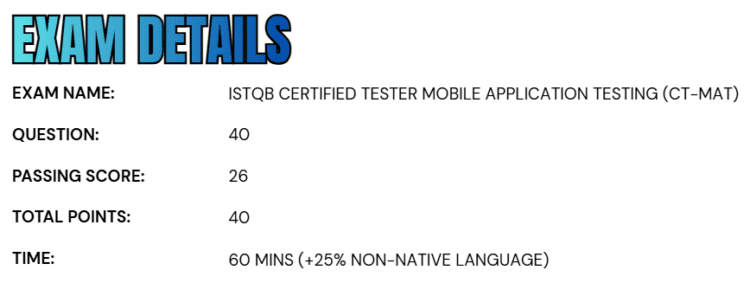
- The Certified Tester Mobile Application Testing (CT-MAT) exam is structured to evaluate a candidate’s understanding of mobile testing concepts and practices through a well-balanced assessment format.
- The examination consists of 40 multiple-choice questions, with each question carrying one point, making a total of 40 points.
- To successfully pass the exam, candidates must achieve a minimum score of 26 points, which reflects a solid grasp of the syllabus topics.
- The standard exam duration is 60 minutes, providing sufficient time to carefully analyze and respond to each question.
- Candidates who are taking the exam in a non-native language are granted an additional 25% time extension, ensuring fairness and accessibility.
Course Outline
The Certified Tester Mobile Application Testing (CT-MAT) exam covers the following topics:
1. Understand the Mobile World – Business and Technology Drivers – 175 mins
1.1 Mobile Analytics Data
- (K2) Describe how available mobile analytics data can be used as input for the test strategy and the test plan.
- (H3) Based on data collected from one or more analytics data sources (geographical location, platform, operating system version and device type distribution), select the device types to be tested and their corresponding prioritization.
Note: HO-1.1.1 and HO-1.7.1 (below) may be combined.
1.2 Business Models for Mobile App
- (K2) Distinguish between various business models for mobile applications.
1.3 Mobile Device Types
- (K1) Recall different types of mobile devices.
1.4 Types of Mobile Applications
- (K2) Distinguish between different types of mobile applications.
1.5 Mobile Application Architecture
- (K2) Distinguish between general architecture types of mobile applications.
1.6 Test Strategy for Mobile Apps
- (K3) Apply characteristics and specifics of the mobile market in preparing a test strategy.
1.7 Challenges of Mobile Application Testing
- (K2) Give examples of the challenges associated with testing mobile applications.
- (H1) Gather market data such as device or operating system market share for a selected region. Gather data for screen sizes and density. Create a list of five devices and calculate the expected market coverage for this list.
Note: HO-1.1.1 (see earlier) and HO-1.7.1 may be combined.
1.8 Risks in Mobile Application Testing
- (K2) Describe how risks specific to mobile applications may be mitigated.
2. Learn about Mobile Application Test Types – 265 mins
2.1 Testing for Compatibility with Device Hardware
- (K2) Describe device-specific features and hardware which should be considered for testing.
- (H1) Test an app for several mobile device functionalities while the system under test (SUT) is in use to verify correct functioning of the SUT.
- (K3) Prepare tests for the app’s compatibility with screen sizes, aspect ratio, and screen density.
- (H3) Test an app on several mobile devices (virtual or physical) to show the impact of the resolution and screen size on the app’s user interface.
- (K2) Describe how tests can show the potential effects of device overheating on the system under test.
- (K1) Recall different test types for testing of the various input sensors used in mobile devices.
- (K1) Recall tests to be run for various input methods.
- (H0) Test an app for various types of inputs including keyboard-related tests with multiple installed keyboards, gesture-related tests and (optionally) camera-related tests.
- (K2) Describe how tests can reveal user interface issues when changing screen orientation.
- (H3) Test an application to check the effect of orientation change on the functionality of the app, including data retention and correctness of the user interface.
- (K3) Prepare tests for an app using typical mobile device interrupts.
- (H3) Test an app for several mobile device interrupts while the application is in use.
- (K3) Prepare tests for changing the access permissions to the device features requested by the app.
- (H3) Test an app’s permissions management by permitting and denying requested permissions and observing behavior when folders and sensor settings are denied at installation or changed after installation.
- (K3) Prepare tests to verify the impact of an app on a device’s power consumption and the impact of its power state on the app.
- (H3) Test an app under varying battery power levels to discover consumption data and establish performance under low and dead battery states.
2.2 Testing for App Interactions with Device Software
- (K3) Prepare tests for the handling of notifications by the system under test.
- (H2) Test the effect of receiving notifications when an app is in the foreground and the background. Test the effect of changing notification settings on the app’s functionality.
- (K2) Describe how tests can verify correct functionality of quick-access links.
- (H3) Test an app for shortcut/quick-access functionality.
- (K3) Prepare tests for the impact on an app of the user preference settings provided by an operating system.
- (H3) Test a running app by changing the input value options for the preferences provided by the operating system
- (K2) Distinguish between different tests required for native, web and hybrid applications.
- (H0) (Optional) Identify the tests needed for apps, depending on the app type.
- (K1) Recall tests required for apps which are available on multiple platforms or operating system versions.
- (K1) Recall tests required for co-existence and interoperability with other apps.
2.3 Testing for Various Connectivity Methods
- (K2) Summarize the tests for connectivity testing, including those across networks, when using Bluetooth and when switching to flight mode.
- (H0) (Optional) Conduct tests on an application which is transferring data to the server when the phone switches between Wi-Fi and cell-data connectivity based on their available signal strengths.

3. Understand Common Test Types and Test Process for Mobile Applications – 200 mins
3.1 Common Test Types applicable for Mobile Applications
- (K3) Prepare installability tests for mobile apps.
- (K3) Prepare stress tests for mobile apps.
- (K2) Give examples of security issues related to mobile apps.
- (K1) Recall time and resource behavior considerations for mobile apps.
- (K3) Prepare usability tests for mobile apps.
- (H2) Choose a tour, a mnemonic or a heuristic for usability testing an app using session-based test management.
Note: HO-3.1.5 and HO-3.3.1, HO-3.3.2 and HO-3.3.3 may be combined.
- (K1) Recognize the type of tests required for database testing of mobile apps.
- (K2) Summarize the tests required for internationalization (globalization) and localization testing of mobile apps.
- (K2) Summarize the need for accessibility testing in mobile application testing.
3.2 Additional Test Levels applicable for Mobile Applications
- (K2) Describe the additional test levels, such as field testing, and the associated extra activities required for effective mobile application testing.
- (K2) Describe the tests required for carrying out application store approval for publishing apps.
3.3 Experience-based Testing Techniques
- (K1) Recall session-based test management, personas, and mnemonics in the context of exploratory mobile testing.
- (H2) Choose a mnemonic (or part thereof) which is specific to mobile application testing for testing of an app using session-based test management.
Note: HO-3.1.5 and HO-3.3.1, HO-3.3.2 and HO-3.3.3 can be performed together.
- MAT-3.3.2 (K2) Describe the usage of tours and heuristics as exploratory techniques for mobile application testing.
- (H2) Choose a mobile specific heuristic to test mobile application.
Note: HO-3.1.5 and HO-3.3.1, HO-3.3.2 and HO-3.3.3 can be combined.
- (K3) Make use of a mobile specific tour (such as the Feature tour) to test a mobile app.
- (H2) Choose a mobile specific tour to test a mobile application.
Note: HO-3.1.5 and HO-3.3.1, HO-3.3.2 and HO-3.3.3 can be combined.
3.4 Mobile Test Process and Approaches
- (K2) Match the test process, as described in [ISTQB_CTFL_2018], to the needs of mobile application testing.
- (K2) Describe the approaches to testing at each test level, specific to mobile application testing.
4. Learn About Mobile Application Platforms, Tools and Environment – 80 mins
4.1 Development Platforms for Mobile Applications
- (K1) Recall the development environments used for mobile application development.
4.2 Common Development Platform Tools
- (K1) Recall some of the common tools supplied as part of application development platforms.
- (H1) Use tools from the software development kit to take screenshots, extract a log and simulate incoming events.
4.3 Emulators & Simulators
- (K2) Understand the differences between emulators and simulators.
- (K2) Describe the use of emulators and simulators for mobile application testing.
- (H1) Create and run a simulated/emulated device, install an app and execute some tests on it.
4.4 Setting up a Test Lab
- (K2) Distinguish between various approaches to set up a test lab.
5. Process of Automating the Test Execution – 55 mins
5.1 Automation Approaches
- (K2) Distinguish between common automation approaches and frameworks for mobile application testing.
5.2 Automation Methods
- (K2) Describe various automation methods for testing mobile apps.
5.3 Automation Tools Evaluation
- (K1) Recall the various parameters to be considered during the evaluation of mobile testing automation tools.
5.4 Approaches for setting up an Automation Test Lab
- (K2) Distinguish between common approaches of creating test labs with advantages and disadvantages with respect to test automation.
ISTQB Certified Tester Mobile Application Testing (CT-MAT) Exam FAQs
ISTQB Certified Tester Mobile Application Testing (CT-MAT) Exam Study Guide
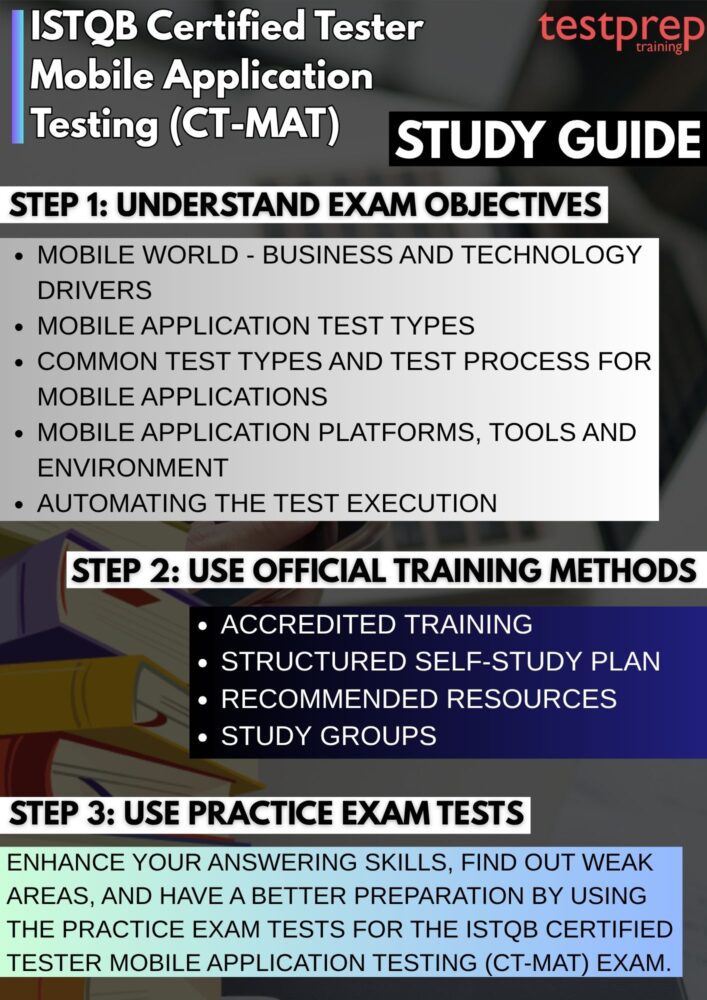
1. Analyze the Exam Objectives and Syllabus Focus
Start your preparation by carefully reviewing the official CT-MAT syllabus to gain a clear understanding of the exam structure, learning objectives, and topic distribution. Identify high-weightage areas and prioritize them accordingly. Focus on mobile-specific topics such as device fragmentation, operating system variations, network conditions, usability, security, and performance testing. Additionally, understand how mobile testing differs from traditional testing, including challenges related to battery usage, interruptions, and platform diversity. Mapping each topic to its corresponding learning objective will help you study with purpose and clarity.
2. Create a Structured and Realistic Study Plan
Design a detailed study plan that breaks the syllabus into smaller, manageable sections. Allocate time based on the complexity and importance of each topic, ensuring a balance between theory, practice, and revision. Set weekly goals and track your progress to stay consistent. Incorporate buffer time for revisiting difficult concepts and avoid overloading your schedule. A well-structured plan not only improves discipline but also reduces stress as the exam approaches. Using techniques like time-blocking or milestone-based learning can further enhance productivity.
3. Enroll in Accredited Training Programs
Participating in training offered by ISTQB Accredited Training Providers can significantly enhance your preparation. These programs are available in multiple formats, including classroom sessions, virtual instructor-led training, and self-paced e-learning. Accredited courses are reviewed and approved by ISTQB Member Boards, ensuring that the content is accurate, up-to-date, and aligned with the official syllabus. In addition to structured learning, these programs often include real-world examples, case studies, and practice exercises that help bridge the gap between theory and practical application.
4. Focus on Self-Study and Recommended Resources
Self-study plays a critical role in reinforcing your understanding of mobile testing concepts. Use the official syllabus as your primary reference and supplement it with recommended books, articles, and online resources. Take detailed notes, create summaries, and highlight key points for quick revision. Pay special attention to terminologies, definitions, and testing techniques, as these are frequently tested. Practicing active learning methods such as mind mapping or flashcards can improve retention and make complex topics easier to understand.
5. Engage with Study Groups and Professional Communities
Joining study groups, forums, or professional communities can provide additional support and motivation throughout your preparation journey. Interacting with other learners allows you to discuss challenging topics, share insights, and clarify doubts. You may also gain access to shared resources, study materials, and practical tips from individuals who have already taken the exam. Collaborative learning environments encourage accountability and help maintain consistency in your preparation.
6. Practice with Mock Tests and Sample Questions
Regular practice is essential for exam success. Attempt multiple mock exams and sample question sets to familiarize yourself with the exam format and question patterns. Focus on improving your time management skills by simulating real exam conditions. After each test, analyze your performance thoroughly—identify weak areas, understand mistakes, and revise those topics accordingly. This iterative process not only strengthens your knowledge but also builds confidence and reduces exam anxiety.
7. Revise Strategically and Prepare for Exam Day
In the final stage of preparation, dedicate time to structured revision. Go through your notes, revisit important concepts, and focus on areas where you previously struggled. Avoid learning new topics at the last minute and instead consolidate your existing knowledge. Ensure you are well-rested before the exam and plan your exam strategy, such as how much time to spend on each question. A calm and confident mindset, combined with thorough preparation, will significantly improve your chances of success.
