

The Google Associate Cloud Engineer (ACE) exam has become a benchmark for professionals looking to validate their cloud expertise on the Google Cloud Platform. As cloud computing continues to dominate the technology landscape, earning this certification not only demonstrates proficiency in deploying and managing cloud solutions but also significantly enhances career prospects.
Many candidates often ask about the difficulty level of the exam. Unlike entry-level certifications that focus purely on theoretical knowledge, the Google Associate Cloud Engineer exam tests practical skills across a range of Google Cloud services, including Compute Engine, Cloud Storage, networking, and security. Understanding both the concepts and their real-world application is key to success. Another aspect that adds to the challenge is the evolving nature of cloud technology. Google regularly updates its platform, and candidates need to stay current with new features and best practices to ensure they can effectively answer scenario-based questions.
Despite these challenges, with structured preparation, hands-on practice, and a clear understanding of exam objectives, the Google ACE exam is achievable for motivated professionals. In the sections that follow, we will explore the exam structure, common pitfalls, and strategies to prepare efficiently and confidently for the exam in 2025.
About the Google Associate Cloud Engineering Exam
Google Cloud Certified Associate Cloud Engineer exam is for those Google Cloud Engineers who have the aptitude to deploy applications, monitor operations, and organize enterprise solutions. Associate Cloud Engineers can use Google Cloud Console and the command-line interface to execute various tasks to maintain one or more deployed solutions on the Google Cloud Platform.
The GCP Associate Cloud Engineer certification is designed for individuals who are just starting their cloud journey or for those who want to demonstrate their knowledge of GCP. The exam covers a range of topics, including deploying applications, managing virtual machines, configuring network settings, and monitoring GCP resources. Google Cloud Platform (GCP) has become one of the leading cloud platforms in recent years, providing a comprehensive set of cloud computing services to organizations worldwide. With this growing popularity, it’s no surprise that Google has created a certification program to validate the skills and knowledge of cloud engineers working with GCP.
While the exam is not considered to be as challenging as other certification exams, such as the Google Professional Cloud Architect or DevOps Engineer, it still requires a significant amount of preparation and understanding of GCP concepts. The exam consists of 50 multiple-choice and multiple-select questions, and you have two hours to complete it. You need to score 70% or higher to pass.
To prepare for the exam, Google recommends having at least six months of experience working with GCP and completing the training courses available on the GCP website. Additionally, you can find various online resources, including study guides, practice exams, and training courses, to help you prepare. Overall, while the GCP Associate Cloud Engineer exam may not be the most challenging certification exam, it still requires significant preparation and knowledge of GCP concepts. With the right preparation and study materials, however, passing the exam and obtaining the certification is achievable.
Glossary of GCP Associate Cloud Engineering Terminology
Here are some common terms used in Google Cloud Platform (GCP) that may be useful for Associate Cloud Engineers:
- GCP – Google Cloud Platform is a suite of cloud computing services provided by Google.
- Compute Engine – A virtual machine service that allows users to run workloads on virtual machines.
- App Engine – A Platform-as-a-Service (PaaS) product that allows developers to build and deploy applications on GCP.
- Kubernetes Engine – A managed container orchestration service that helps deploy, manage, and scale containerized applications.
- Cloud Storage – A scalable and durable object storage service that allows users to store and retrieve data.
- BigQuery – A serverless data warehousing and analytics service that allows users to analyze large datasets in real-time.
- Cloud SQL – A fully managed database service for MySQL, PostgreSQL, and SQL Server.
- Cloud Pub/Sub – A messaging service that allows decoupling and asynchronous communication between components of an application.
- Cloud CDN – A content delivery network that helps distribute content globally with low latency and high data transfer speeds.
- Cloud IAM – A service for managing access control and permissions for GCP resources.
- Cloud Monitoring – A service that provides visibility into the performance, uptime, and health of GCP resources.
- Cloud Logging – A service that allows users to store, search, and analyze logs generated by GCP resources.
- Cloud Functions – A serverless compute service that allows users to run code in response to events without having to manage infrastructure.
- Cloud Run – A fully managed serverless compute platform that enables users to run stateless containers on GCP.
- Cloud AutoML – A suite of machine learning products that enables users to build custom machine learning models with little or no coding experience.
Exam Preparation Resources for the GCP Associate Cloud Engineering Exam
There are several resources available online to help you prepare for the Google Cloud Platform (GCP) Associate Cloud Engineer certification exam. Here are some of the best resources:
- Official Exam Guide: Google provides an official exam guide that outlines the topics covered on the exam. This guide is a great starting point for your preparation. You can find the exam guide here: https://cloud.google.com/certification/guides/cloud-engineer/
- Coursera Course: Google offers an official Coursera course that covers the topics on the exam. The course includes video lectures, hands-on labs, and quizzes.
- Qwiklabs: Google’s Qwiklabs platform provides hands-on labs that allow you to practice working with GCP. Many of these labs are directly related to the topics covered on the exam.
- Google Cloud Documentation: Google’s official documentation provides detailed information on all of the GCP services. You can use the documentation to study the technical details of each service covered on the exam. You can access the documentation here: https://cloud.google.com/docs
- Practice Exams: There are several practice exams available online that simulate the real exam experience. These exams are a great way to assess your readiness for the exam. Here are some links to practice exams:
- Official Google Practice Exam: https://cloud.google.com/certification/practice-exam/cloud-engineer
- Testprep Training Practice Exam: https://www.testpreptraining.ai/google-cloud-certified-associate-cloud-engineer-free-practice-test
How hard is the Google Associate Cloud Engineering Exam?
Now that we have discussed the format and outline of the exam, we can come to the main question: Google Associate Cloud Engineer difficulty. The Google Cloud Platform Associate Cloud Engineer (ACE) exam requires a person to debug theoretical problems in realistic hands-on scenarios by thinking through the data flows. Also, Google’s ACE exam has “Choose the right service” or “What’s the best practice” questions.
The exam is a little bit difficult if one isn’t prepared well. Many of the questions will challenge one’s knowledge as well as their time management skills. Considering all the factors, we can say that it is certainly a hard nut to crack. However, with the right resources and dedicated efforts, you can earn the certification. To help you with this, we have listed the resources that you should use while preparing for the exam.
Google Associate Cloud Engineering Study Guide 2025
There is a wide variety of assets accessible on the web. However, the issue is, only a few out of these sources can be trusted. Therefore, we’ve screened out the best and most trusted resources that you should pick for the preparations.
Google Associate Cloud Engineer Study Guide
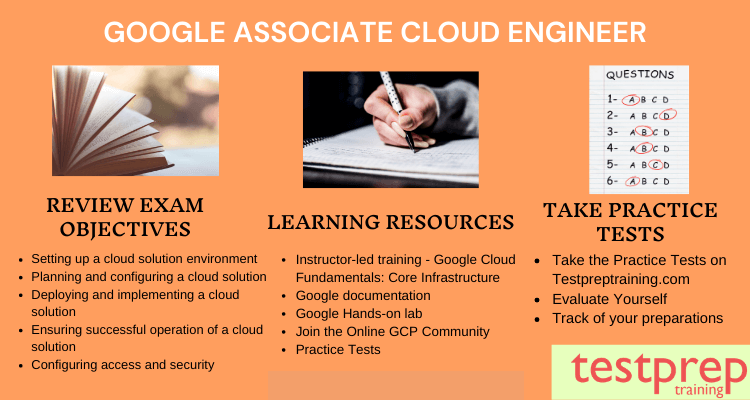
To start with, it is highly recommended to first check out the Google Associate Cloud Engineer study guide by Google itself. This guide is the best resource to get all the exam-related details. Since it is an official document, it is 100% authentic. This guide will help you understand the exam objectives thoroughly. Also, you can check it out for any changes or updates made by google. With this guide, you can effectively plan out a strategy to prepare for the exam.
Start your preparation with Google Associate Cloud Engineer Cheat Sheet
Google Associate Cloud Engineer Training
Google offers several training options for various domains. You can access all the training through Qwiklabs, which is an official partner of Google. We recommend you to take the training named – Architecting with Google Compute Engine. It is an instructor-led course where an expert will explain to you various topics of the course. This will also help you in learning practical skills. Also, consider our Google Associate Cloud Engineer Tutorials to gain an in-depth understanding of the concepts covered in the exam, with several useful study resources.

Hands-on Practice
The GCP associate Cloud engineering exam is designed in a way that both your theoretical and practical skills will be put to test. Thus, it is important to build technical skills to earn the credential. For this, Qwiklabs and GCP free tier offer hands-on labs that can help you in improving your practical skills.
Evaluate yourself with Practice Tests
After putting in all your hard work, it is time to finalize your preparations. For this, you must take Google Associate Cloud Engineer practice tests. It is essential to test yourself multiple times to get honest feedback about your level of expertise in the given domain. Thus, we advise you to regularly attempt practice tests. These tests are designed to match the standards set by the actual exam. Hence, with each attempt, you will gain experience and also learn about managing the time while attempting the actual exam. Test yourself today with our Google Associate Cloud Engineer Exam Questions!

Expert-Level Study Guide: Google Associate Cloud Engineer Exam (2025)
The Google Associate Cloud Engineer exam tests your ability to deploy, manage, and monitor applications on Google Cloud. Success comes from understanding concepts deeply and applying them in real-world scenarios rather than just memorizing theory. The guide below breaks down key exam areas, practical approaches to learning, and tips to master each domain effectively.
| Exam Domain | Key Topics | Practical Approach / Hands-on Practice | Expert Tips | Estimated Preparation Time |
|---|---|---|---|---|
| 1. Setting Up a Cloud Environment | Projects, Billing, IAM roles, APIs, Quotas | Create multiple projects, explore billing settings, and assign different roles to team members in a sandbox environment | Focus on understanding permissions and project hierarchy; practice quickly switching between projects | 5–7 hours |
| 2. Planning and Configuring a Cloud Solution | VPCs, Subnets, Firewalls, Routes, Shared VPC | Design small network setups, configure firewalls, test connectivity between subnets | Visualize network flow and test by pinging services; simulate real-world network setups | 8–10 hours |
| 3. Deploying and Implementing Cloud Solutions | Compute Engine, App Engine, Cloud Run, Kubernetes Engine | Deploy sample apps using different compute services, experiment with autoscaling | Try deploying the same app across multiple services to compare behavior and costs | 12–15 hours |
| 4. Ensuring Successful Operation of a Cloud Solution | Monitoring, Logging, Alerts, Error Reporting | Set up dashboards, trigger alerts, and simulate errors to see how logs capture issues | Learn to interpret metrics and logs quickly—real-time troubleshooting is key | 6–8 hours |
| 5. Configuring Access and Security | IAM roles, Service Accounts, Security Policies, Encryption | Create service accounts with different permissions, encrypt test data, restrict access to resources | Always follow least-privilege principles and test access scenarios | 6–8 hours |
| 6. Managing and Provisioning Cloud Resources | Storage Buckets, Cloud SQL, Load Balancing, Autoscaling | Create storage buckets, provision databases, and configure load balancers | Practice scaling resources up and down to understand cost and performance trade-offs | 10–12 hours |
| 7. Troubleshooting and Optimizing | Debugging, Logs, Alerts, Performance | Simulate common issues like failed deployments, network misconfigurations, and database errors | Practice resolving issues end-to-end; this builds confidence for scenario-based exam questions | 8–10 hours |
